Rear Hitch Slip Sensitivity
NOTE: Tractor must be equipped with radar, and load depth control must be in draft control mode for hitch slip to function see Using Draft Control in this section of this Operator’s Manual).
Hitch can be operated with draft sensing only, or with draft sensing and hitch slip. Hitch slip adjustment is independent from draft response.
|
Response Setting Guidelines1 |
|
|---|---|
|
Chisel Plow |
2—4 |
|
Subsoiler |
5—7 |
|
Moldboard Plow |
7—9 |
|
V-Ripper |
8—10 |
-
Select rear hitch slip sensitivity module.
-
To adjust slip sensitivity, use decrease value button (B) or increase value button (C).
Higher values provide more/quicker response to slip variation. Lower values provide less/slower response to slip variation.
Changes to slip sensitivity are immediate.
NOTE: Changing rear hitch slip response can affect operation when wheel slip is above 10%.
Rear hitch slip response automatically returns to zero during transport [speed above 20 km/h (12.4 mph)].
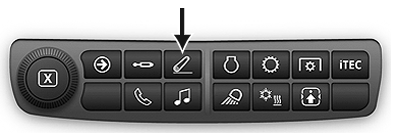
RXA0133710-UN-16JUL13
Rear Hitch Shortcut Button on Navigation Bar
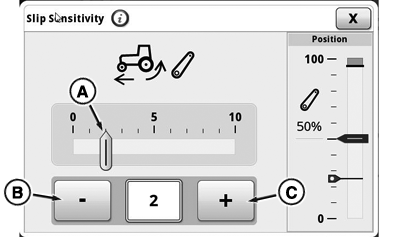
RXA0143178-UN-03JUL14
Rear Hitch Slip Sensitivity Module
A - Slip Sensitivity Indicator
B - Decrease Value Button
C - Increase Value Button
|
1 Appropriate setting depends on implement type,
soil conditions, and tractor setup
|
GH15097,000086F-19-20140711 |