Navigate to Controls Setup
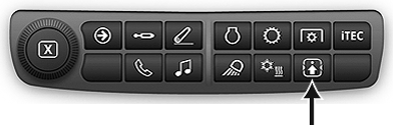
RXA0133715-UN-16JUL13
Controls Setup Shortcut Button on Navigation Bar
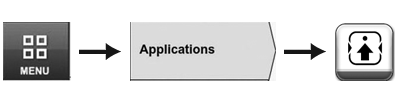
RXA0130061-UN-01AUG13
Menu → Applications Tab → Controls Setup Icon
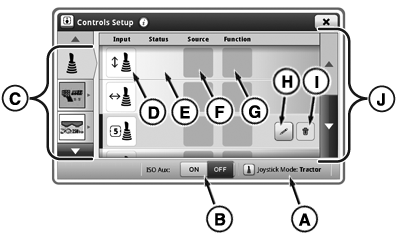
RXA0137961-UN-18DEC13
Controls Setup Page
A - Joystick Mode Icon
B - ISO Aux On/Off Toggle
C - Device List
D - Input Device
E - Status
F - Source
G - Function
H - Add or Edit Assignment Button
I - Delete Assignment Button
J - Scroll Bar
Controls Setup page allows user to assign device (D) with various tractor and implement functions (G). Once completed, function may be performed by activating assigned device.NOTE: Some ISOBUS joysticks may not be able to be assigned to tractor and implements functions.
 CAUTION: ISOBUS Controller detected Improper operation can cause
unintended machine movement.
CAUTION: ISOBUS Controller detected Improper operation can cause
unintended machine movement.
To avoid death or serious injury to bystander, understand how this display operates the functions of each machine
Read the ISOBUS controller’s operator’s manual.
CAUTION: Improper operation can cause unintended implement movement.
To avoid the risk of death or serious injury to a bystander, ensure:
- Users know which function is mapped to each control.
- Controls are properly labeled.
Message above occurs when ISOBUS control unit or ISO Aux is enabled. If necessary, review or change ISOBUS joystick assignments. Immediately after message, operator can decline or accept by pressing appropriate buttons. If “Cancel” is selected, all ISOBUS joysticks are disabled. If “Accept” is selected, all ISOBUS joysticks are enabled.
Example—Two switch ISOBUS compliant joystick is used to control drawn sprayer equipped with ISOBUS control unit. Sprayer has two controlled functions: pump on/off and boom on/off. Using Controls Setup feature, each function may be assigned to one of ISOBUS joystick switches.
Controls Setup Page
Use Controls Setup Shortcut Button on Navigation Bar or follow alternative path:
-
Select Menu.
-
Select Applications tab.
-
Select Controls Setup icon.
|
KT81203,00000AD-19-20140102 |