Use the Brakes
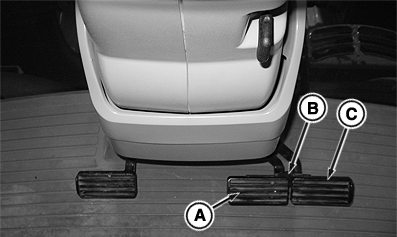
RXA0129148-UN-30OCT12
A - Left Brake Pedal
B - Pedal Lock Tab
C - Right Brake Pedal
 CAUTION: Avoid possible injury from losing control of tractor:
- Lock brake pedals together with pedal lock tab (B) when operating on roads.
- Reduce speed if towed load weighs more than tractor or when transporting loads under adverse conditions. Avoid hard braking applications. (See Transporting Towed Equipment, in Transport Section of this Operator’s Manual.)
- Tractor wheels may lock and skid on slippery downhill slopes. For IVT™/AutoPowr™ tractors, see Downhill Operation and Slippery Conditions, in the IVT™/AutoPowr™ Transmission section.
IMPORTANT: MFWD engages if MFWD Brake Assist mode is selected and both brake pedals are depressed at speeds above 5 km/h (3 mph) (see Mechanical Front-Wheel Drive (MFWD) in this section for more information).
IMPORTANT: DO NOT rest feet on brake pedals during tractor operation to avoid unnecessary wear on brakes and increased fuel consumption.
Test brakes with engine stopped to be sure manual brake system is functioning (see 250 Hour Service section of this Operator’s Manual).
Use individual brake pedals to assist in making sharp turns when working in field.
Depress both brake pedals (A and C) to stop tractor while disengaging clutch pedal. Use brake pedal lock tab (B) to lock brakes together.
Individual brake pedals can assist with slow speed off road turning, such as when hooking up implements.
Maintain at least 1800 engine rpm during aggressive braking events to ensure adequate cooling oil flow is directed to vehicle brakes. Do not over speed engine as it may cause damage to engine or transmission components.
For IVT™/AutoPowr™ Tractors Only
When operating at slow idle, individual brake pedals stop tractor without use of clutch pedal. To assist slow speed turning, depress either brake pedal while slowly increasing engine speed until desired turn is achieved. Returning engine speed to slow idle while continuing to depress one brake pedal will slow tractor to stop.
Using Brakes with AutoClutch (If Equipped)
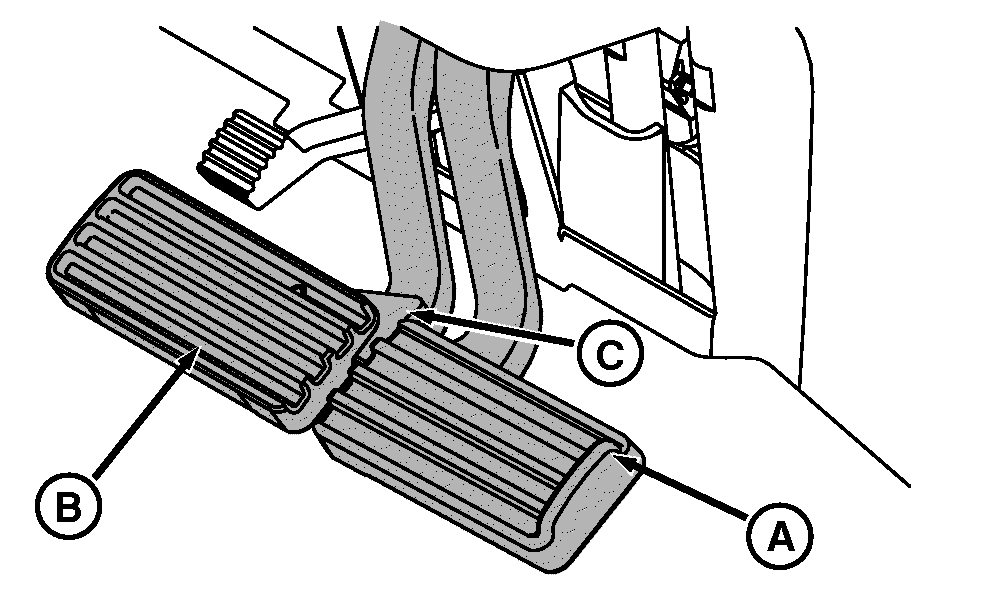
RXA0122335-UN-17NOV11
A - Right Brake Pedal
B - Left Brake Pedal
C - Pedal Lock Tab
CAUTION: Avoid possible injury. Braking tractor while commanding
high engine speed requires higher brake pedal force.
Avoid possible injury due to sudden or unexpected acceleration. When brake pedals are released, tractor automatically accelerates to speed currently commanded by throttle and speed control levers.
IMPORTANT: Damage to brakes could result if brake pedals are not locked together during transport when using AutoClutch
For IVT™/AutoPowr™ Tractors Only: Individual brake pedals (A) and (B) can assist with slow speed off-road turning, such as hooking up to implements. At low idle, AutoClutch feature stops tractor if operator depresses only one brake pedal. IT IS NOT NECESSARY TO DEPRESS CLUTCH PEDAL.
To assist in hooking up implement, depress either brake pedal while slowly increasing engine speed until desired turn is achieved. Returning engine speed to low idle while continuing to depress one brake pedal slows tractor to stop.
Parking Tractor with AutoClutch
-
Depress both brake pedals. Brakes activate AutoClutch (automatic clutch function within transmission) to stop tractor. It is not necessary to depress clutch, reduce throttle, or move speed control lever.
CAUTION: Avoid possible injury due to losing control of tractor.
Use pedal lock tab (C) to couple brake pedals together when driving
on roads. -
Move speed control lever to slowest position and stop tractor.
CAUTION: Always place reverser lever in PARK position before
dismounting tractor. -
Shift reverser or shift lever to PARK position.
Transmission PARK position holds tractor stationary.
-
Lower implements and shut off PTO.
-
Shut engine off and remove key.
|
IVT is a trademark of Deere & Company AutoPowr is a trademark of Deere & Company |
KT81203,00000B3-19-20140701 |