Activate and Set FieldCruise™
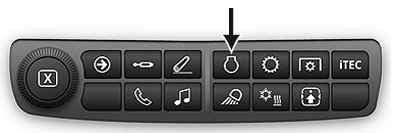
RXA0133711-UN-16JUL13
Engine Shortcut Button on Navigation Bar
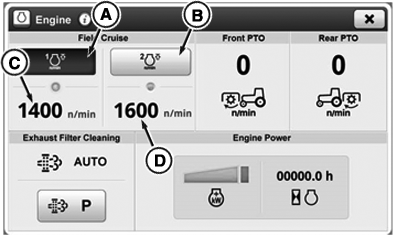
RXA0132500-UN-15MAY13
Engine Page
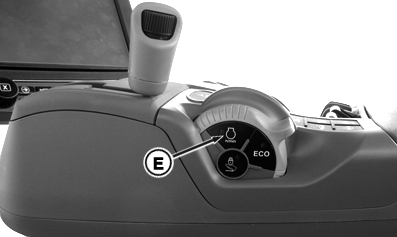
RXA0137795-UN-12DEC13
FieldCruise™ ON/OFF Button on CommandARM™
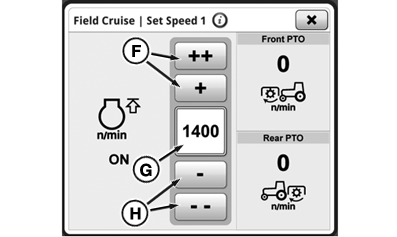
RXA0141564-UN-13MAY14
FieldCruise™ Set Speed 1 Page
A - FieldCruise™ Speed 1 On/Off Toggle Button
B - FieldCruise™ Speed 2 On/Off Toggle Button
C - FieldCruise™ Set Speed 1 Input Module
D - FieldCruise™ Set Speed 2 Input Module
E - FieldCruise™ ON/OFF Button
F - FieldCruise™ Set Speed Increase Buttons
G - FieldCruise™ Set Speed Input Box
H - FieldCruise™ Set Speed Decrease Buttons
Limiting engine speed in light load situations may improve fuel economy. FieldCruise™ utilizes a constant speed governor curve, providing instant response to varying loads. Two different FieldCruise™ speeds can be set, enabling operator to toggle quickly from one to the other.
Activate FieldCruise™
Engine must be running for FieldCruise™ adjustment to operate.
-
Select Engine Shortcut Button on Navigation Bar
-
When engine page appears, select FieldCruise™ Speed 1 (A) or 2 (B) ON/OFF toggle button.
NOTE: FieldCruise™ can also be activated using FieldCruise™ ON/OFF button (E) on CommandARM™. When CommandARM™ FieldCruise™ ON/OFF button is pressed, last FieldCruise™ mode selected with CommandCenter™ will be activated.
Adjust FieldCruise™ Set Speed
FieldCruise™ is an upper limit to engine speed. Engine speed limit can be adjusted from 1100 to 2150 RPM. Changes to FieldCruise™ take place immediately.
-
Select FieldCruise™ Set Speed 1 (C) or 2 (D) input module.
-
When FieldCruise™ Set Speed 1 or 2 page appears, select desired speed by using FieldCruise™ Set Speed increase (F) or decrease (H) button. “++” and “- -” buttons increase or decrease values at higher rate than “+” and “-” buttons. FieldCruise™ Set Speed value appears in FieldCruise™ Set Speed input box (G).
|
FieldCruise is a trademark of Deere & Company CommandARM is a trademark of Deere & Company CommandCenter is a trademark of Deere & Company |
KT81203,0000113-19-20140718 |