Configuring Selective Control Valves - Independent Mode
SCVs in Independent Mode have two detent flow and two detent time settings, one for extend and one for retract.
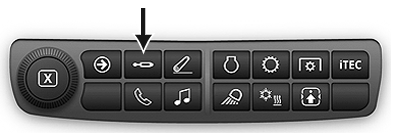
Press SCV shortcut button on Navigation Bar.
RXA0133709-UN-16JUL13
SCV shortcut button on Navigation Bar
RXA0131827-UN-19AUG13
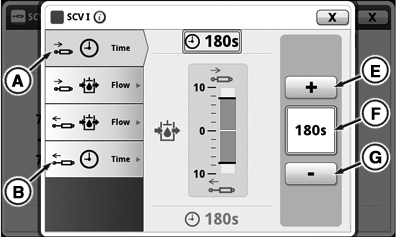
Independent SCV Detent Time Setting
RXA0131877-UN-19AUG13
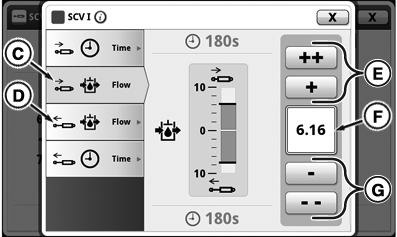
Independent SCV Detent Flow Setting
RXA0131232-UN-09MAY13
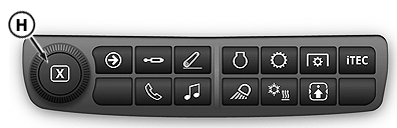
Display Shortcut Bar
A - Retract Detent Time Tab
B - Extend Detent Time Tab
C - Retract Detent Flow Tab
D - Extend Detent Flow Tab
E - Increase Time/Flow Buttons
F - Input Box
G - Decrease Time/Flow Buttons
H - Adjusting Dial
-
Select an SCV that is in Independent Mode.
-
Select Detent Time Retract tab (A) or Detent Time Extend tab (B).
NOTE: Detent time displays amount of time in input box (F). Pressing (+) will increase time in 1 second increments up to 10, then increments of every 2 seconds up to 20, then increases every 5 seconds to 30, then by 30 seconds up to C for continuous and by pressing (-) will decrease time setting by the same increments.
-
To increase detent time press buttons (E) or to decrease press buttons (G). Also adjusting dial (H) can be used to increase or decrease desired detent time setting.
-
Select Detent Flow Retract tab (C) or Detent Flow Extend tab (D).
NOTE: Flow is displayed in increments of 0.04 beginning at 0.04 through 10 located in input box (F). Pressing (+) will increase flow by 0.04, pressing (++) increases flow by 1.00, and by pressing (-) and (- -) will decrease flow setting by the same increments.
-
To increase flow press buttons (E) or to decrease press buttons (G). Also adjusting dial (H) can be used to increase or decrease flow setting.
|
RD47322,0000239-19-20131022 |