Use AutoClutch (If Equipped)
IMPORTANT: Damage to brakes could result if brake pedals are not locked together during transport when using AutoClutch.
IVT™/AutoPowr™ and e23™ transmissions are equipped with an AutoClutch feature. With AutoClutch, when the operator presses the brake pedals, clutch begins disengaging, pressing brake pedals further then applies the rear brakes (Front brakes as well - if equipped).
Adjusting AutoClutch Sensitivity
RXA0133712-UN-16JUL13
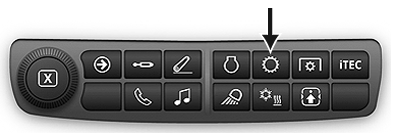
Transmission Shortcut Button on Navigation Bar

RXA0128094-UN-14SEP12
Menu → Tractor Settings Tab → Transmission Icon

RXA0130326-UN-11JAN13
Advanced Settings Icon → Settings Tab
RXA0137943-UN-17DEC13
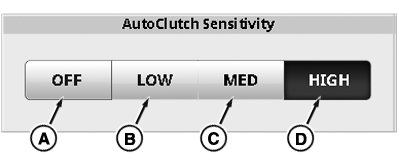
AutoClutch Sensitivity and Acceleration Aggressiveness Module
A - AutoClutch ON/OFF Toggle
B - Low AutoClutch Sensitivity Toggle
C - Medium AutoClutch Sensitivity Toggle
D - High AutoClutch Sensitivity Toggle
Press Transmission Shortcut button or follow alternative path:
-
Select Menu.
-
Select Tractor Settings tab.
-
Select Transmission icon.
-
Select Advanced Settings icon.
-
Select Settings tab.
-
Select appropriate AutoClutch setting.
- ON/OFF (A) disables or enables AutoClutch.
- Low (B) is for heavy trailers (load).
- Medium (C) is for medium trailers (load).
- High (Factory Default) (D) is for light or no trailer (load).
NOTE: To keep AutoClutch from disengaging before trailer brakes are applied, AutoClutch Sensitivity options allow operator to adjust AutoClutch settings to load requirements. Larger trailers take lower AutoClutch Sensitivity settings. AutoClutch Sensitivity factory default setting is set to High, which will support most operations.
|
IVT is a trademark of Deere & Company AutoPowr is a trademark of Deere & Company e23 is a trademark of Deere & Company |
RD47322,0000260-19-20140626 |