IVT™/AutoPowr™ Modes and Set Maximum Speed
RXA0133712-UN-16JUL13
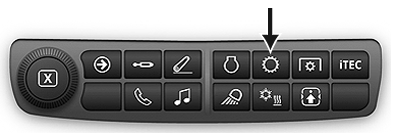
Transmission Shortcut button on Navigation Bar

RXA0128094-UN-14SEP12
Menu button → Tractor Settings button→ Transmission button
RXA0130021-UN-05JUN13
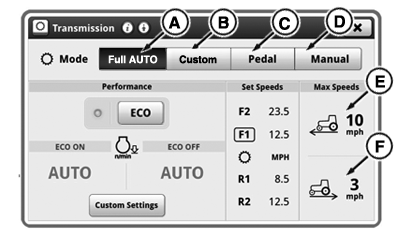
Transmission Home Page
A - Full Auto Mode
B - Custom Mode
C - Foot Pedal Mode
D - Manual Mode
E - Forward MAX Speed
F - Reverse MAX Speed
Press Transmission Shortcut Button on Navigation Bar or follow alternative path:
- Press Menu button.
- Press Tractor Settings button.
- Press Transmission button.
IVT™/AutoPowr™ offers three modes for fuel efficiency and load control from tractor:
-
Full Auto Mode (A)
Automatically adjusts Minimum Engine Speed allowing tractor to use most fuel efficient engine speed under light load.
Automatically adjusts Auto Shift Engine Speed Droop allowing tractor to use peak power under full load.
-
Custom Mode (B)
Operator can choose Performance, Minimum Engine Speed, Auto Shift Engine Speed Droop, and Load Anticipation reaction.
-
Foot Pedal Mode (C)
Operator can control wheel speed independently of engine speed by using the accelerator pedal. Operator can only choose Pedal Mode when the tractor is stopped and park brake is applied.
-
Manual Mode (D)
Tractor performs as if equipped with normal transmission and reacts to controls. No Fuel Economy or Load Control functions active.
|
Full Auto Mode (A) |
Custom Mode (B) |
Pedal Mode (C) |
Manual Mode (D) |
|
|
When hand throttle control is pulled all the way to the rearward position:
When hand throttle control is at any other position:
|
|
Forward maximum speed (E) or reverse maximum speed (F) displays maximum reverse or forward speed limits. To change maximum speed, select module, use increase (+) or decrease (-) buttons to set value. Increasing speed does not change dynamic behavior of tractor. If operator changes maximum forward or reverse speed below current set speed, set speed decreases to maximum speed and vehicle speed decreases.
|
1 (See Downhill Operation in Slippery Conditions
in this section.)
|
RD47322,0000327-19-20140103 |