Custom IVT™/AutoPowr™ Settings
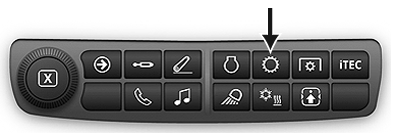
RXA0133712-UN-16JUL13
Transmission Shortcut Button on Navigation Bar
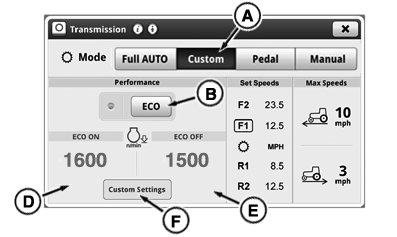
RXA0130022-UN-16DEC13
Transmission Home Page
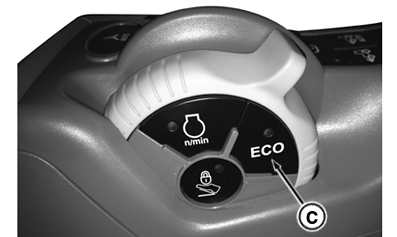
RXA0137863-UN-21MAR14
Hand Throttle Control
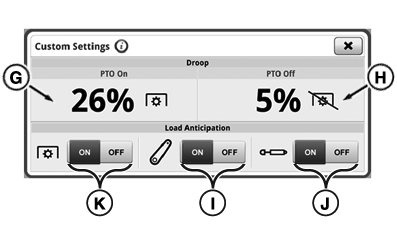
RXA0130023-UN-16DEC13
Transmission Custom Settings Page
A - Custom mode Toggle
B - ECO Button (ON/OFF-Activated when light is illuminated)
C - ECO Button (ON/OFF-Activated when light is illuminated)
D - ECO Engine Speed ON
E - ECO Engine Speed OFF
F - Custom Settings button
G - Auto Shift Engine Speed Droop PTO ON
H - Auto Shift Engine Speed Droop PTO OFF
I - Hitch Load Anticipation Toggle
J - SCV Load Anticipation Toggle
K - PTO Load Anticipation Toggle
NOTE: All settings pertaining to this page are only applicable when AutoPowr™ transmission is in Custom Mode.
This tractor is equipped with an ECO setting. With ECO ON, the tractor minimizes engine speeds, which reduces acceleration aggressiveness and fuel consumption in lighter steady loads. ECO OFF is tuned to maximize productivity. Operators can set a minimum engine speed for both ECO ON and ECO OFF. ECO is turned ON/OFF by pressing button (B) on the transmission home page or corresponding ECO button (C) on hand throttle control.
Load Anticipation allows IVT™/AutoPowr™ transmission to predict loads with hitch or SCVs in use. By default, Load Anticipation is enabled in "Full AUTO" mode selected on Transmission page. In "Custom" mode, load anticipation for hitch is enabled when hitch toggle (I) is turned to ON. In "Custom" mode, load anticipation for SCVs is enabled when SCV toggle (J) is turned to ON. In "Custom" mode, load anticipation for PTO is enabled when PTO toggle (K) is turned to ON.
Load anticipation feature may raise minimum engine speed to 1500 rpm when load anticipation is enabled and either hitch/SCV/PTO is placing heavy load on engine or SCV is in continuous flow. If load on engine is still excessive, load anticipation feature may raise minimum engine speed to 1800 rpm.
Press Transmission Shortcut Button on Navigation Bar.
Press Custom mode toggle (A).
Set ECO Engine Speed RPM ON
- Press ECO ON Engine Speed module (D).
- Adjust percentage value using increase (+) or decrease (-) to set desired value.
Set ECO Engine Speed RPM OFF
- Press ECO OFF Engine Speed module (E).
- Adjust percentage value using increase (+) or decrease (-) to set desired value.
Set Auto Shift Engine Speed Droop PTO ON
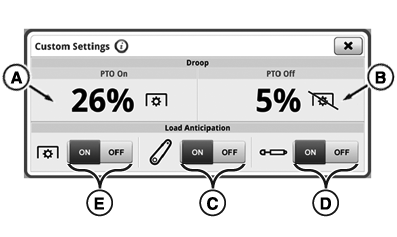
RXA0137865-UN-16DEC13
Transmission Custom Settings Page
A - Auto Shift Engine Speed Droop PTO ON
B - Auto Shift Engine Speed Droop PTO OFF
C - Hitch Load Anticipation Toggle
D - SCV Load Anticipation Toggle
E - PTO Load Anticipation Toggle
-
NOTE: Auto Shift Engine Speed Droop PTO ON can be set from 2%
—26%.
- Press Auto Shift Engine Speed Droop module PTO ON (A).
- Adjust percentage value using increase (+) or decrease (-) to set desired value.
Set Auto Shift Engine Speed Droop PTO OFF
-
NOTE: Auto Shift Engine Speed Droop PTO OFF can be set from
2% — 26%.
- Press Auto Shift Engine Speed Droop module PTO OFF (B). PTO OFF box highlights.
- Adjust percentage value using increase (+) or decrease (-) to set desired value.
Turn On Load Anticipation
- Press Hitch toggle (C), SCV toggle (D), or PTO toggle (E) to on. When SCV toggle is on, engine speed is boosted as needed, with each use of SCV. When Hitch toggle is on, engine speed is boosted as needed, each time hitch is raised or lowered.
|
AutoPowr is a trademark of Deere & Company IVT is a trademark of Deere & Company |
RD47322,0000328-19-20140103 |