Stopping and Parking Tractor
RXA0068273-UN-27AUG03
RXA0130864-UN-06FEB13
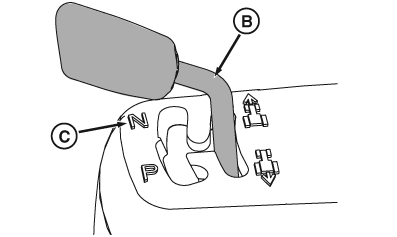
Left-Hand Reverser Shown In Power Zero™
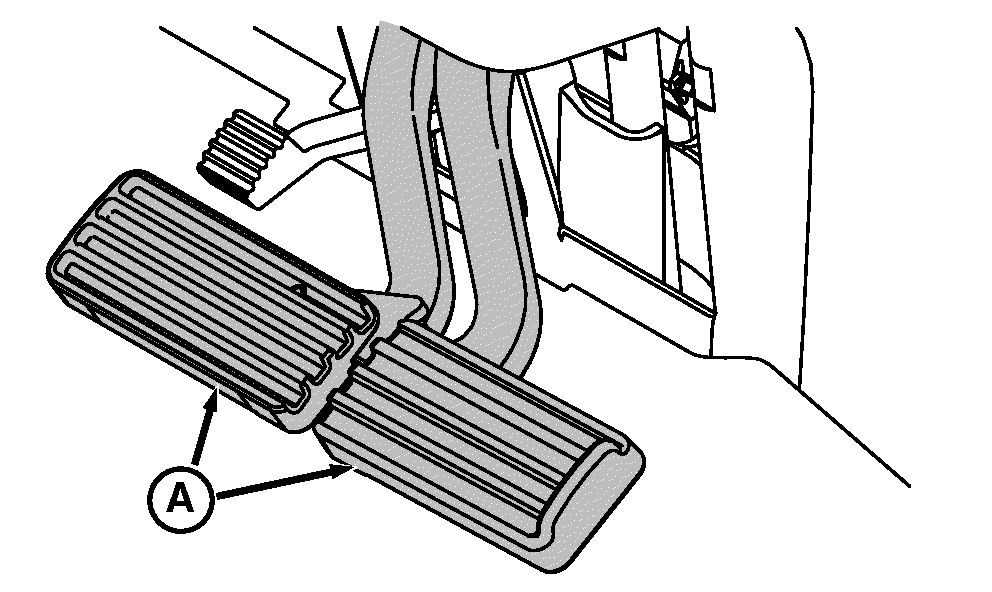
A - Brake Pedals
B - Power Zero™ Position
C - NEUTRAL Position
-
Reduce throttle to low engine rpm
-
Depress both brake pedals. Brakes activate AutoClutch (automatic clutch function within transmission) to stop tractor. It is not necessary to depress clutch
 CAUTION: Avoid possible injury due to losing control of tractor.
Couple brake pedals (A) together when driving on roads.
CAUTION: Avoid possible injury due to losing control of tractor.
Couple brake pedals (A) together when driving on roads. -
Move speed control lever to slowest position.
-
Shift reverser to PARK position.
Using PARK Position
CAUTION: Always place reverser lever in PARK position before
dismounting tractor.Transmission PARK position holds tractor stationary.
-
Lower implements and shut off PTO.
-
Shut engine off and remove key.
Stopping Tractor using AutoClutch
Depress both brake pedals. Brakes will activate AutoClutch. When brakes are released, tractor accelerates to currently commanded speed. It is not necessary to depress clutch, reduce throttle, or move speed control lever.
CAUTION: Avoid possible injury. Braking tractor while commanding
a high engine speed will require higher brake pedal force.
Avoid possible injury due to sudden or unexpected acceleration. When brake pedals are released, tractor will automatically accelerate to speed currently commanded by throttle and speed control lever.
Using Power Zero™ Position
Hold reverser lever in Power Zero™ position (B) to temporarily hold tractor stationary.
NOTE: Depending on speed and load, Power Zero™ may not bring tractor to stop if already in motion.
Using NEUTRAL Position
Transmission NEUTRAL position is obtained (with engine running) by shifting reverser to NEUTRAL position. Tractor will roll freely in NEUTRAL position.
|
RD47322,000032E-19-20140103 |