CommandARM™ Joystick (If Equipped)
RXA0133920-UN-11NOV13
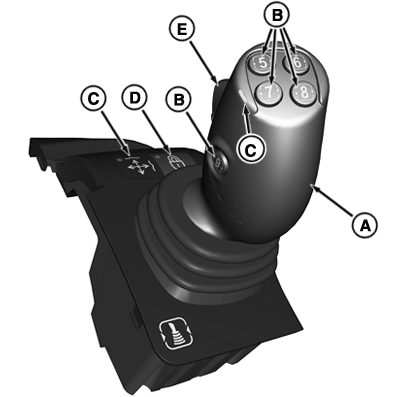
CommandARM™ Joystick

RXA0133735-UN-17JUL13
Controls Setup Icon
A - Joystick (If Equipped)
B - Joystick Buttons
C - Joystick Activation Indicator Light
D - Joystick Lock
E - Joystick Rocker Switch
Operating SCVs With Joystick
- The Control Setup Icon appears around Controls that may be setup to control other functions. Review the Controls Setup page to verify the function of each control.
- The axes of the joystick (A) operates combinations of programmed front or rear SCV(s) functions.
- Tractors equipped with either the CommandQuad™ or the e23™ transmissions can select gear upshift (button 5) (B) and downshift (button 7) (B) for their joystick buttons located on top of the lever.
- Joystick activation indicator light (C) is ON when joystick is active.
- Joystick lock (D) is used to lock out electro-hydraulic functions for SCV(s) assigned to Joystick.
- Rocker switch (E) operates combinations of programmed SCV(s) functions.
- The operator can assign an SCV to a joystick axis but still be able to switch between an SCV control lever and the joystick control lever.
- The joystick will override the SCV control lever of the SCV(s) assigned to its axes when the joystick is enabled.
- Move joystick to the right twice in brief succession beyond the point of resistance and hold it there. This activates the bucket shake function. (Only when joystick loader mode setting is “ON”.)
- Push the joystick all the way forward and engage in detent to activate the float position. The joystick lever remains in the detent until it is pulled back. (Detent does not function in loader mode.)
- In Loader mode, time detents for SCV(s) assigned to the joystick axes cannot be adjusted, only flow detents can be adjusted for those SCV(s).
Joystick Controls Custom Setup
RXA0133715-UN-16JUL13
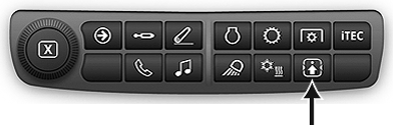
Controls Setup Shortcut Button on Navigation Bar
RXA0137972-UN-04FEB14
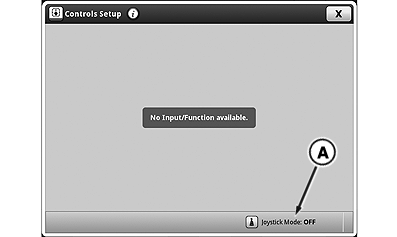
Controls Setup Page
RXA0138010-UN-18DEC13
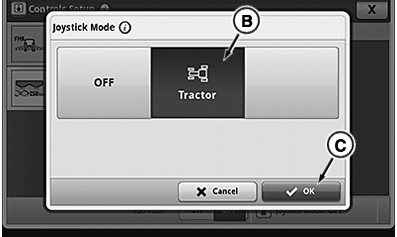
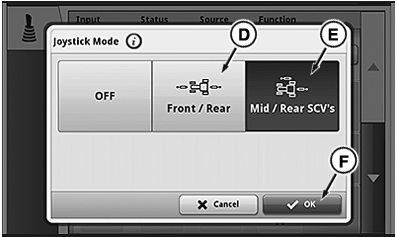
Joystick Mode Page
RXA0138011-UN-18DEC13
Joystick Mode Page
A - Joystick Mode
B - Tractor Mode
C - OK Button
D - Front/Rear Mode
E - Mid/Rear Mode
F - OK Button
Press Controls Setup Shortcut Button on Navigation Bar:
-
Press Joystick Mode (A).
-
Select Tractor Mode (B), then confirm using OK button (C).
-
Select Front/Rear Mode (D) or Mid/Rear Mode (E), then confirm using the OK button (F).
In Tractor Mode, only SCVs I to VI can be activated.
In Front/Rear Mode, only SCVs I to VI and front hitch, XIV and XV can be activated.
In Mid/Rear Mode, only SCVs I to VI and X to XIII can be activated.
NOTE: Only one mode can be activated at a time.
RXA0133929-UN-20JAN14
Controls Setup Page
RXA0133467-UN-20JAN14
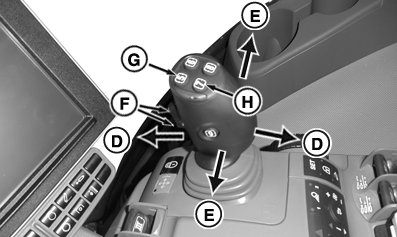
Joystick
RXA0133468-UN-20JAN14
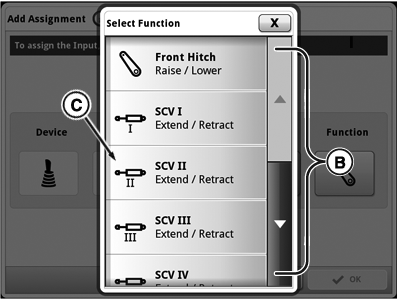
Select Function Page
RXA0138492-UN-16JUN14
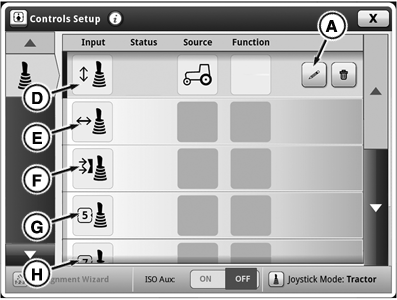
Controls Setup Page
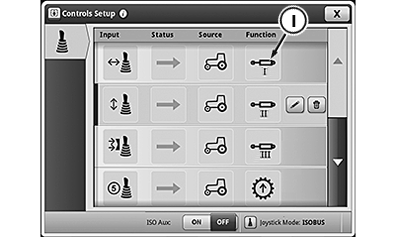
A - Edit Function Button
B - Available Functions List
C - Close Out Button
D - Fore/Aft Axis
E - Left/Right Axis
F - Rocker Switch
G - Joystick Button 5
H - Joystick Button 7
NOTE: Joystick buttons 5 (G) and 7 (H) are preassigned from the factory for up and downshifting respectively with the CommandQuad™ and the e23™ transmission.
-
Select desired Custom Assignments buttons (D through F) to change programmed function on joystick.
-
Press edit function button (A).
-
Select from list of functions (B) tractor is equipped with and press desired function to assign.
-
Press close out button (C) to go back to controls setup page.
New programmed function (I) appears in function column across from custom assignment button.
Removing Custom Assignments
RXA0138964-UN-27MAY14
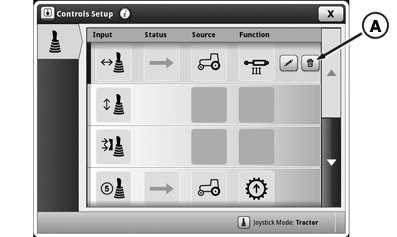
Remove Current Joystick Assignment
RXA0138963-UN-27MAY14
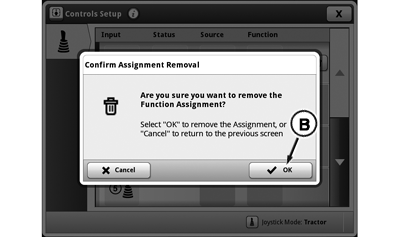
Confirm Joystick Assignment Removal
A - Joystick Assignment Delete Button
B - Confirm Assignment Removal OK Button
To change or remove the SCV that is assigned, press joystick assignment delete button (A) and then press confirm assignment removal OK button (B).
Layout and Joystick Lever Functions
RXA0138484-UN-01JUL14
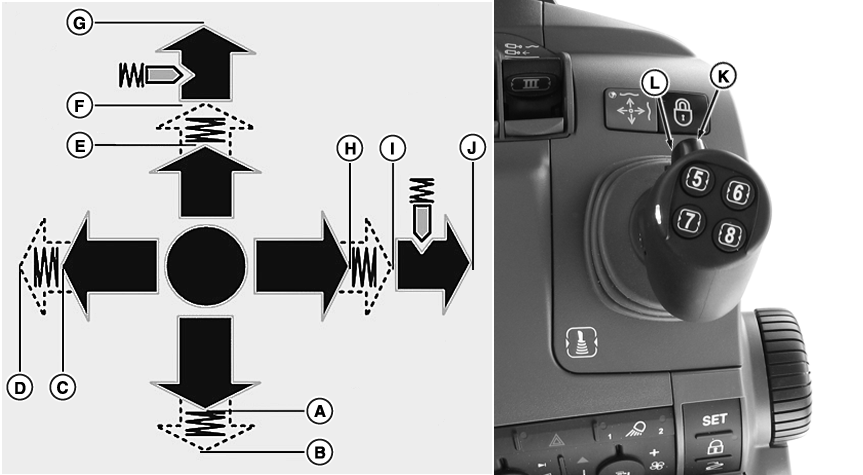
Joystick Movements
NOTE: The description of the joystick movements are made with the assumption that the hoses are connected so that extend is pulling the joystick back, retract is pushing the joystick forward. Moving the joystick to the left is extend and retract is to the right.
|
A |
Pull joystick back to extend. |
|
B |
Pull joystick back beyond the point of detectable resistance to extend detent. |
|
C |
Move joystick to the left to extend. |
|
D |
Move joystick to the left beyond the point of detectable resistance to extend detent. |
|
E |
Push joystick forward to retract. |
|
F |
Push joystick forward beyond the point of detectable resistance to retract detent. |
|
G |
Push joystick all the way forward and engage in detent to activate the float position. |
|
H |
Move joystick to the right to retract. |
|
l |
Move joystick to the right beyond the point of detectable resistance to retract detent. Move the multi-function lever to the right twice in brief succession beyond the point of resistance and hold it there. This activates the bucket shake function. |
|
J |
Move joystick all the way to the right and engage in detent to activate the float position. |
|
K |
Move rocker switch up beyond the point of detectable resistance for extend detent. |
|
L |
Move rocker switch down beyond the point of detectable resistance for retract detent. |
Operator can set any SCV on any axis or rocker switch of the joystick.
NOTE: Some functions shown may not be available depending upon what options the tractor is equipped with.
|
RD47322,0000337-19-20140731 |