CommandCenter™ Transmission Main Page
RXA0133712-UN-16JUL13
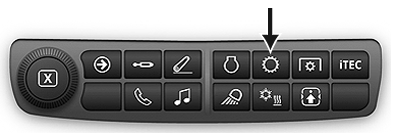
Transmission Shortcut Button on Navigation Bar
RXA0143051-UN-26JUN14
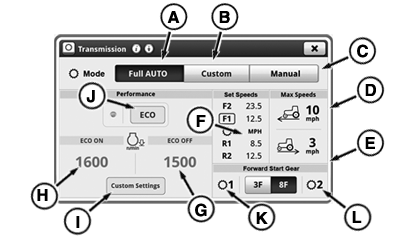
Transmission Main Page
RXA0143166-UN-01JUL14
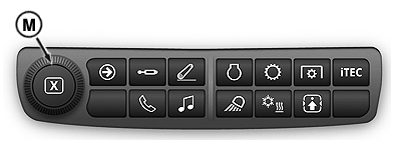
Adjusting Dial
A - Full AUTO Mode
B - Custom Mode
C - Manual Mode
D - Maximum Forward Speed Setting
E - Maximum Reverse Speed Setting
F - Set Speeds Module
G - ECO Engine Speed Off Setting
H - ECO Engine Speed On Setting
I - Custom Settings button
J - ECO Level button
K - Forward Start Gear 1
L - Forward Start Gear 2
M - Adjusting Dial
The e23™ transmission offers three modes of operation to optimize fuel efficiency and load control of the tractor. These modes are selected from the CommandCenter™ transmission main page.- Full AUTO (A) — Automatically adjusts engine speed and gear selection to optimize fuel economy and performance. This mode automatically responds to loads created by the hitch or SCV’s. During PTO use, engine speed is automatically controlled to provide appropriate PTO speed.
- Custom (B) — Similar to Full AUTO mode except the operator can modify some of the limits and parameters used in Full AUTO mode. See custom transmission settings in this section.
- Manual (C) — Operator selects engine throttle position and gear.
Maximum Ground Speed
The maximum tractor ground speed may be limited through the transmission main page. Forward maximum speed (D) and reverse maximum speed (E) displays maximum forward and reverse speed limits.
Changing Maximum Ground Speed
Press Transmission Shortcut Button on Navigation Bar.
-
Press appropriate speed limit on the Transmission Main page. The value adjustment page appears.
-
Adjust the ground speed to the desired value by using increase (+) and decrease (-) buttons. Also turning adjusting dial (M) can be used to increase or decrease ground speed settings.
NOTE: If operator changes maximum forward or reverse speed below current speed, the set speed (F) decreases to the maximum speed and the vehicle speed will decrease.
Efficiency Manager™ Set Speed
There are two programmable set speeds for each direction used in Efficiency Manager™. They are activated by pushing the set speed buttons on CommandArm™. Once activated, Efficiency Manager™ will shift gears and change engine speed so that the ground speed will match the set speed. The set speeds are changed through the set speed adjusting wheel. (See Efficiency Manager™ in this section.)
|
RD47322,00004FD-19-20140804 |