Advanced Settings Page
RXA0133712-UN-16JUL13
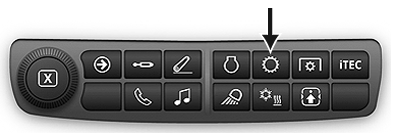
Transmission Shortcut Button on Navigation Bar
RXA0130326-UN-11JAN13
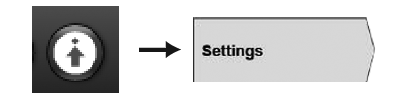
Advanced Settings Icon → Settings Tab
RXA0143167-UN-01JUL14
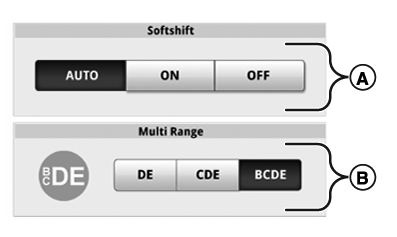
Transmission Settings Page 1
RXA0143168-UN-01JUL14
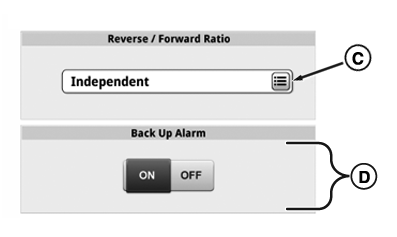
Transmission Settings Page 2
Press Transmission Shortcut Button on Navigation Bar.
- Press Advanced Settings Icon.
- Press Settings Tab.
- A— Softshift Toggle Bar: Use to change Softshift to AUTO, ON, or OFF.
- B— Multi-Range Toggle Bar: Use to change Multi Range button range to DE, CDE, or BCDE.
- D—Reverse/Forward Ratio button Select to access list of reverse/forward ratio options.
- E— Back Up Alarm ON/OFF Toggle: If Equipped.
Multi-range Button Settings
Multi-range button can be set for applicable ranges (B) and start gear (C).
Ranges available for this button are DE, CDE, or BCDE. When Multi-Range button is selected, transmission is able to shift through these ranges when in both Manual Mode and AUTO Mode.
Start gears available for Multi-Range button vary from B1 to D4. In AUTO Mode, start gear is also used as low idle gear. In any Range Lock Mode, start gear is Gear 3.
Adjust Reverse/Forward Speed Ratio
During shuttle shift, reverse gear can be selected to match forward gear.
Reverse/Forward ratio can be set to operate independent of each other, same as, between 1 to 3 gears slower, or 1 to 3 gears faster than selected forward gear.
In Manual Mode, transmission uses this setting to choose new gear in same range in opposite direction. In AUTO Mode, transmission uses this setting to adjust set speed in opposite direction.
NOTE: If +3 is selected and gear is currently C4 in forward, C4 is range/gear in reverse.
Independent setting allows tractor to remember last forward and reverse gear setting. Once gear is manually changed in reverse direction, gear automatically returns to last gear when changing directions. If gear is not manually changed when in reverse direction, then forward gear and reverse gear remains same when changing directions. In AUTO Mode, reverse and forward set speeds function independent of each other.
Enable/Disable Softshift
Softshift provides smoother shifting between gears by providing short intermediate engine rpm adjustments between each gear shift.
- During upshift, engine rpm momentarily decreases at beginning of shift and then returns to current throttle setting.
- During downshift, engine rpm momentarily increases at beginning of shift and then returns to current throttle setting.
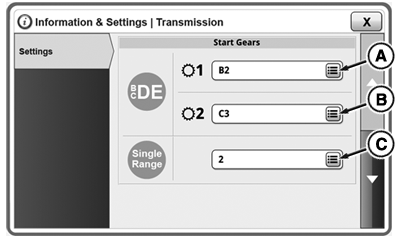
Select Multi Range Start Gear 1
NOTE: Operators have the option of setting up to two multi range forward startup gears and one single range startup gear with the CommandQuad™.
RXA0143359-UN-07JUL14
Start Gears
RXA0143054-UN-30JUN14
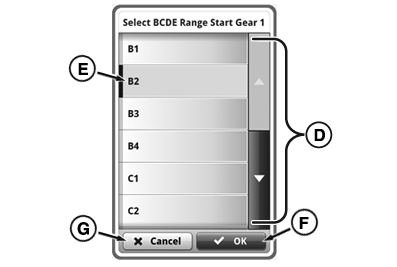
BCDE Range Start Gear 1 Overlay
A - BCDE Forward Start Gear 1 Drop Down
B - BCDE Forward Start Gear 2 Drop Down
C - Single Range Start Gear
D - BCDE Range Start Gear 1 Overlay
E - Desired Gear
F - OK button
G - Cancel button
-
Press BCDE Forward Start Gear 1 Drop Down button (A). List of forward gears appears.
-
Scroll through list of gears (D).
-
Select desired gear (E) and press OK button (F) to finish selection or (G) to cancel.
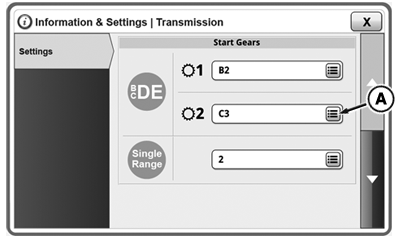
Select Multi Range Start Gear 2
RXA0143162-UN-30JUN14
Start Gears
RXA0143163-UN-30JUN14
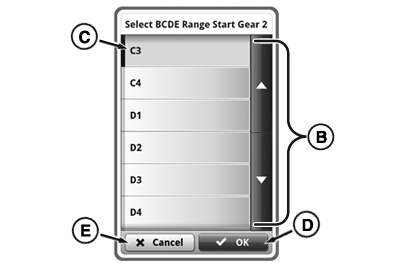
BCDE Range Start Gear 2 Overlay
A - BCDE Forward Start Gear 2 Drop Down
B - BCDE Range Start Gear 2 Overlay
C - Desired Gear
D - OK button
E - Cancel button
-
Press BCDE Forward Start Gear 2 Drop Down button (A). List of forward gears appears.
-
Scroll through list of gears (B).
-
Select desired gear (C) and press OK button (D) to finish selection or (E) to cancel.
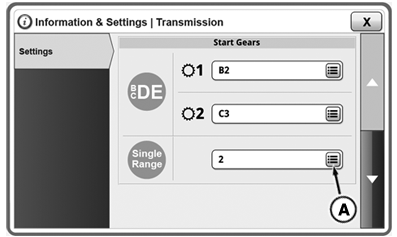
Select Single Range Gear
RXA0143164-UN-30JUN14
Start Gears
RXA0143165-UN-30JUN14
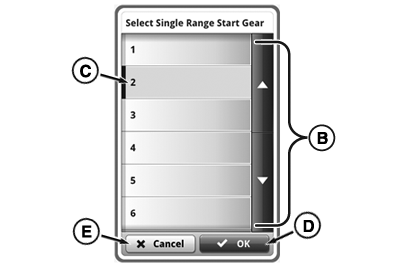
Single Range Start Gear Overlay
A - Single Range Start Gear Drop Down
B - Single Range Start Gear Overlay
C - Desired Gear
D - OK button
E - Cancel button
-
Press Single Range Start Gear Drop Down button (A). List of forward gears appears.
-
Scroll through list of gears (B).
-
Select desired gear (C) and press OK button (D) to finish selection or (E) to cancel.
|
RD47322,000050E-19-20140707 |