Contact List

RXA0127909-UN-11SEP12
Menu → Tractor Settings Tab → Phone Icon → Favorites Button
RXA0132498-UN-28JUN13
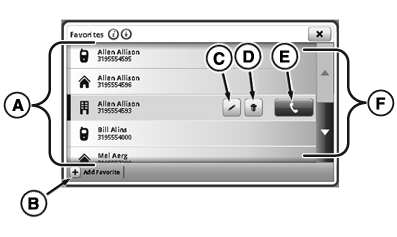
Phone Favorites Page
RXA0132499-UN-28JUN13
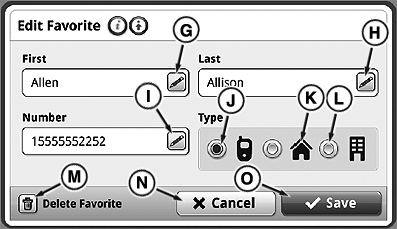
Edit Favorite Page
- Select Menu.
- Select Tractor Settings tab.
- Select Phone icon.
- Select Favorites button.
NOTE: Device’s phone book synchronizes with radio, not CommandCenter™. Contacts must be added and edited manually on display.
Maximum number of phone numbers that can be stored in CommandCenter™ is 25. Maximum number of characters in phone number is 21.
A—Favorite List: List of available contacts.
IMPORTANT: Favorites are stored permanently and can be viewed by any operator. Clear favorites before leaving tractor, if necessary.
B—Add Favorite Button: Select to add contact manually
C—Edit Favorite Button: Select to edit current contact.
D—Delete Button: Select to delete contact from favorites.
E—Call Button: Select to call currently selected contact.
F—Scroll Bar: Select to scroll up or down.
G—Edit Favorite First Name: Select to edit first name.
H—Edit Favorite Last Name: Select to edit last name.
I—Edit Favorite Phone Number: Select to edit phone number.
J—Mobile Phone Button: Select to list contact information under mobile phone.
K—Home Phone Button: Select to list contact information under home phone.
L—Work Phone Button: Select to list contact information under work phone.
M—Delete Favorite Button: Select to delete contact.
N—Cancel Button: Select to cancel edits.
O—Save Button: Select to save edits.
|
CommandCenter is a trademark of Deere & Company |
TO84419,000008E-19-20140718 |