Recent Calls

RXA0130118-UN-21DEC12
Menu → Tractor Settings Tab → Phone Icon → Recent Button
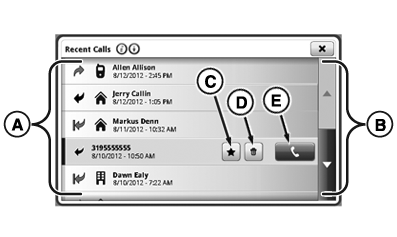
RXA0132556-UN-28JUN13
Recent Calls Page
Review previous missed, incoming or outgoing calls placed or received through CommandCenter™.
- Select Menu.
- Select Tractor Settings tab.
- Select Phone icon.
- Select Recent button.
A—Recent Calls Contact List: List of recently called contacts.
B—Scroll Bars: Use to scroll up or down through recent calls contact list.
C—Add Favorite Button: Select to add contact to favorites.
D—Delete Button: Select to delete contact from favorites.
E—Call Button: Select to call currently selected contact.
|
CommandCenter is a trademark of Deere & Company |
TO84419,000008F-19-20140721 |