Pairing Bluetooth® Device—On Generation 4 CommandCenter™
RXA0126314-UN-29APR13
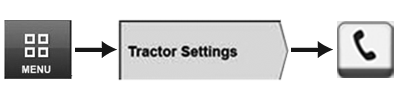
Menu → Tractor Settings Tab → Phone Icon
RXA0132157-UN-28JUN13
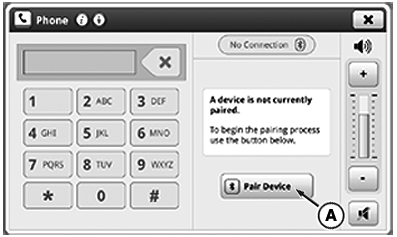
Pair Device Page
RXA0140526-UN-25MAR14
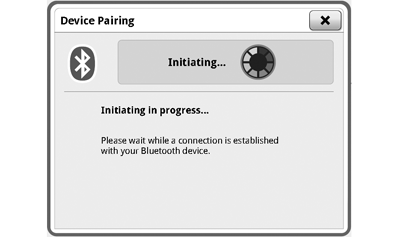
Device Pairing Page
RXA0137741-UN-13DEC13
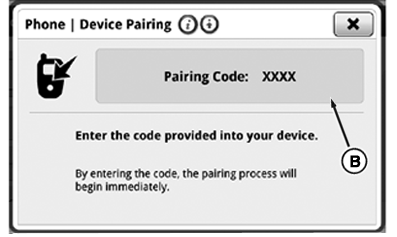
Pairing Code Page
A - Pair Device Button
B - Pairing Code Box
Radio system is equipped with integrated Bluetooth®, which allows data transfer between radio system and paired close-range Bluetooth® device such as cell phone.
NOTE: Make sure device's Bluetooth® ability is enabled when trying to pair device to radio Bluetooth® feature. Not ALL devices are able to use radio's Bluetooth® feature.
NOTE: When pairing Bluetooth® device to radio, pairing process cancels if changes are made to radio (ex: changing source or frequency).
- Select Menu.
- Select Tractor Settings tab.
- Select Phone icon.
- Select Pair Device button (A).
- Use Bluetooth® menu on device to locate and start pairing process. Wait until connection is established with device.
- When provided, enter pairing code displayed in Pairing Code box (B) into device. Pairing process will begin immediately.
Once cell phone is connected successfully, “Pairing Complete” is displayed. Up to 5 device pairings can be stored in radio's Bluetooth® feature. When phone is first paired with radio’s Bluetooth® feature, radio sends device synchronization request. If request is accepted, phone book is synchronized. If not accepted, contact list feature is disabled. To re-syncronize radio and device’s phone book, turn cell phone Off and back On. Phone book does not appear on CommandCenter™ display.
Cell Phone Signal/Battery Strength
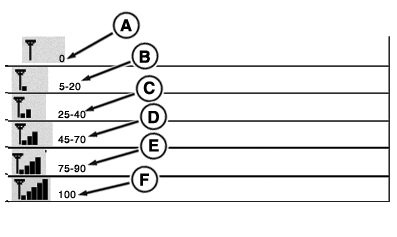
RXA0121552-UN-31OCT11
Signal Strength Display
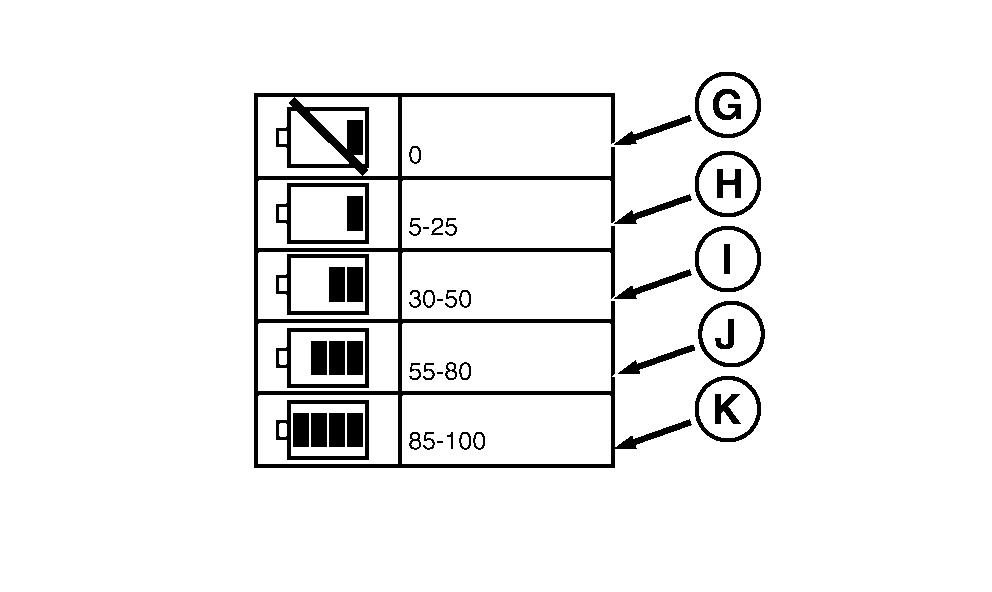
RXA0121554-UN-31OCT11
Battery Charge Displays
Five Phone Signal Strength bars (F) indicate maximum cell phone signal strength.Four Phone Battery Charge bars (K) indicate maximum cell phone battery charge.
A—No Signal
B—5—20 Percent Signal Strength
C—25—40 Percent Signal Strength
D—45—70 Percent Signal Strength
E—75—90 Percent Signal Strength
F—100 Percent Signal Strength
G—No Battery Charge
H—5—25 Percent Battery Charge
I—30—50 Percent Battery Charge
J—55—80 Percent Battery Charge
K—85—100 Percent Battery Charge
|
Bluetooth is a trademark of Bluetooth SIG CommandCenter is a trademark of Deere & Company |
TO84419,0000090-19-20140718 |