Adjust ComfortCommand™ with HCS Plus1 Cab Suspension Seat
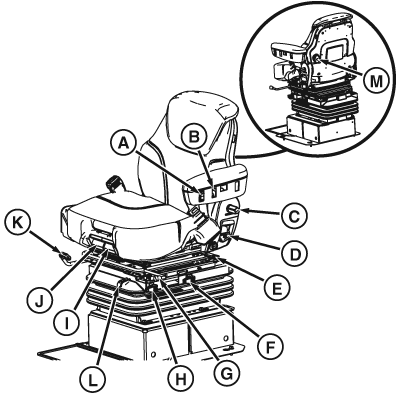
RXA0131464-UN-09SEP13
ComfortCommand™ with HCS Plus Cab Suspension Seat
A— Height Adjustment Switch - Turn key to “ON”. Press lower portion of switch to lower seat or press upper portion of switch to raise seat.
B—Heat/Vent Level Control Switch - Press to adjust level of heat or ventilation.
C—LH Armrest Tilt Adjustment Knob - Turn knob to adjust armrest angle.
D—Seat Back Recliner Adjustment Handle - Pull up to adjust back of seat.
E—Lateral Attenuation Lever - Pull lever up to move seat from side to side. Lock lever into position when at desired location.
F—Ride Firmness Control - Pull lever to one of four positions to adjust the damping of seat.
G—Fore/Aft Attenuation - Adjust seat to control amount of fore/aft movement from tractor. Seat absorbs some movement from shock impacts while driving.
H—Seat Swivel Handle - Lift on handle to allow seat to swivel. Push down on handle to lock seat in position.
I—Cushion Height Adjustment - Pull to adjust height of cushion up or down.
J—Fore/Aft Cushion Adjustment - Pull to adjust cushion forwards or backwards.
K—Fore/Aft Adjustment Lever - Lift up on handle, move seat forward or backward, press handle back down to lock into place.
L—Ideal Weight Indicator - Gauge shows when seat is adjusted to operator’s weight and height. Green marking will be visible when adjusted.
M—Lumbar Adjustment Knob - Turn knob clockwise to add support to lower back. Turn counterclockwise to lessen resistance to lower back.
|
ComfortCommand is a trademark of Deere & Company 1 Hydro-pneumatic Cab Suspension Plus |
TO84419,000009F-19-20130923 |