Generation 4 CommandCenter™ HVAC Settings
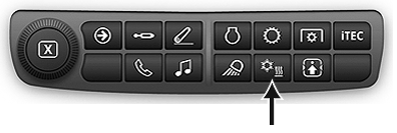
RXA0133716-UN-16JUL13
HVAC Shortcut Button on Navigation Bar
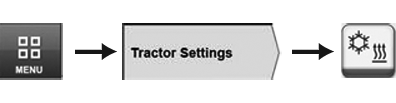
RXA0126574-UN-25OCT12
Menu → Tractor Settings Tab → HVAC Icon
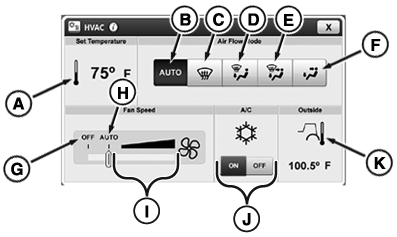
RXA0133683-UN-19JUL13
HVAC Page
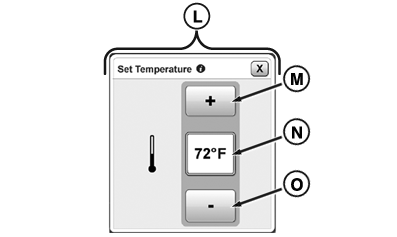
RXA0133684-UN-19JUL13
Set Temperature Page
To access the main page, use shortcut buttons or follow alternative path:
- Select Menu.
- Select Tractor Settings tab.
- Select HVAC (Heating, Ventilation, and Air Conditioning) icon.
A—Set Temperature Module: Select
to access Set Temperature page (M).
B—Auto
Air Flow Toggle: Select for air flow to be auto adjusted.
C—Defrost Toggle: Select to activate
defrost.
D—Defrost and Floor Toggle: Select to activate defrost and floor vents.
E—Defrost, Floor, and Cab Toggle: Select
to activate defrost, floor, and cab vents.
F—Cab and Floor Toggle: Select to activate floor and
cab vents.
G—Fan OFF: Move
slide bar to OFF position to turn fan off.
H—Fan AUTO: Adjust slide bar to AUTO position to have
fan be auto adjusted.
I—Fan Increment
Bar: Use to adjust fan speed. As slide moves right, fan strength
increases. As slide moves left, fan strength decreases.
IMPORTANT: If system is not cooling properly, turn air conditioning switch off to avoid possible compressor damage.
J—A/C Toggle: Use to turn A/C
ON or OFF.
K—Outside Temperature
Module: Displays the temperature outside of the cab.
L—Set Temperature Page: Page used
to adjust cab temperature.
M—Increase
Button: Select to increase temperature in cab.
N—Display Temperature Box: Displays the
temperature setting.
O—Decrease
Button: Select to decrease temperature in cab.
|
TO84419,00000A4-19-20140521 |