Parked Exhaust Filter Cleaning
RXA0133711-UN-16JUL13
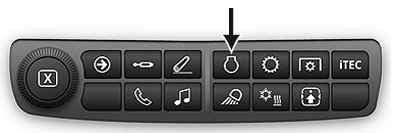
Engine Shortcut Button on Navigation Bar
RXA0132839-UN-04JUN13
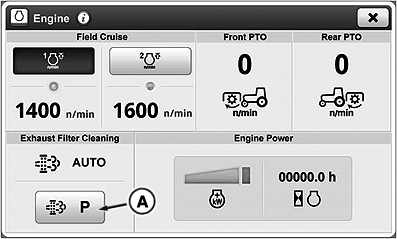
Engine Page
RXA0141402-UN-02MAY14
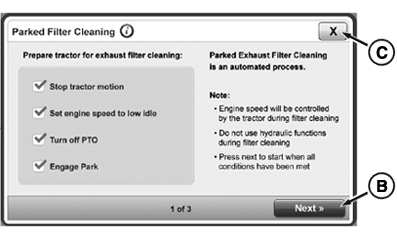
Parked Filter Cleaning Conditions
A - Parked Exhaust Filter Cleaning Button
B - Next Button
C - Close Window Button
Parked exhaust filter cleaning is automated to allow system to clean exhaust filter when required. During process engine speed is controlled by system and machine must remain parked to complete procedure. Time required for parked exhaust filter cleaning process is dependent upon level of exhaust filter restriction, ambient temperatures, and current exhaust gas temperature. CommandCenter™ prompts provide estimated time for completion.
Follow path to perform Parked Exhaust Filter Cleaning:
- Press Engine Shortcut Button on Navigation Bar.
- Select Parked Exhaust Filter Cleaning button (A).
-
Conditions for Parked Exhaust Filter Cleaning
to occur are as follows:
- Stop tractor motion
- Set engine speed to low idle
- Turn off PTO
- Engage PARK
If any of these conditions are not met, procedure will not occur.
-
Select Next button (B) once conditions
are met.
IMPORTANT: During parked exhaust filter cleaning operation, engine may operate at elevated idle.
Engine speed will be controlled by machine during filter cleaning.
NOTE: At any time during parked procedure, process can be canceled by advancing throttle, engaging transmission, selecting cancel button, or stopping engine.
-
Status page appears when process starts.
Parked exhaust filter cleaning has two steps: preparation and cleaning. During preparation, exhaust filter system controls engine speed to increase exhaust temperature. During cleaning, diesel particulates or soot are cleaned from exhaust filter system. Parked exhaust filter cleaning may exceed 40 minutes.
- Once parked exhaust filter cleaning process is complete, select Close Window button (C) to return to previously opened screen.
|
CommandCenter is a trademark of Deere & Company |
TO84419,00000BA-19-20140821 |