Operate Triple-Link Suspension Plus (TLS™ Plus) and Cab Suspension (If Equipped)

RXA0127014-UN-20JUL12
Menu → Tractor Settings Tab → Suspension Icon
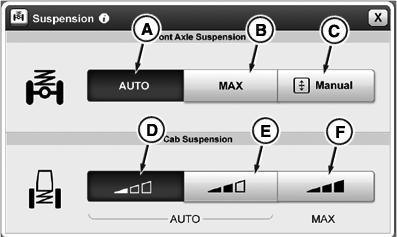
RXA0131033-UN-18FEB13
Suspension Page
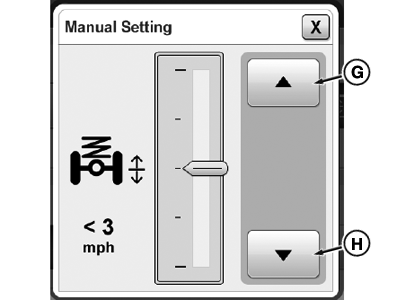
RXA0131034-UN-18FEB13
Manual Settings Page
A - Front Axle Suspension Auto Setting button
B - Front Axle Suspension MAX Setting button
C - Manual Positioning Setting button
D - Cab Suspension Auto Soft Setting button
E - Cab Suspension Auto Medium Setting button
F - Cab Suspension MAX Setting button
G - Raise button
H - Lower button
IMPORTANT: Cab suspension should never hit end stops. If this occurs, select a stiffer setting.
- Select Menu .
- Select Tractor Settings tab.
- Select Suspension Icon.
- Select desired front axle and cab suspension setting.
TLS™ Plus Front Axle Suspension can be set for two different firmness levels and a manual positioning option: “AUTO” (A), “MAX” (B), and “Manual” (C).
Suspended front axle engages whenever tractor speed exceeds 0.5 km/h (0.3 mph). There is a delay in control after tractor begins moving. Suspension is active anytime transmission is not in PARK.
If "Auto" (A) is selected, suspension reacts in response to surrounding conditions and events. Provides best possible comfort by looking at inputs such as travel speed, surface characteristics, implement weight, implement usage and braking activity.
If ”MAX” (B) is selected, suspension is set to maximum firmness (e.g. for operation with a front loader). When travel speed exceeds 30 km/h (18 mph), ”MAX” setting is deactivated. When travel speed drops below 20 km/h (12 mph) again, ”MAX” setting is reactivated.
When “Manual” (C) is selected, operator is able to adjust chassis height by pressing Raise button (G) or Lower button (H). Manual setting is overridden when travel speed exceeds 5 km/h (3 mph). When overridden, system returns to previously selected mode (Auto or MAX).
Cab Suspension can be set for three different firmness levels: “Auto Soft” (D), “Auto Medium” (E), and “MAX” (F).
“Auto Soft” (D) enables cab suspension to operate from 0%—100% stiffness. Provides best suspension for transport situations. Cab suspension moves most with this setting. If less cab movement is desired, select a stiffer setting.
“Auto Medium” (E) enables cab suspension to operate from 50%—100% stiffness. Provides best suspension for field operation.
“MAX” (F) enables cab suspension to always operate at 100% stiffness. Most suitable for loader operations or operations that require frequent shuttle shifting.
Start Up Mode
- TLS™ Plus does not move until placed into either forward or reverse gear.
- TLS™ Plus flexes when transmission shift lever is placed out of park.
- If tractor has settled, TLS™ Plus may rise about 25 mm (1 in.) seeking to center.
- Automatic leveling is allowed when tractor wheel speed is above 0.5 km/h (0.3 mph).
TLS™ Plus in Locked Conditions (Restricted Mode)
- Operator activates hitch raise/lower switch.
- Transmission shift lever placed in PARK position.
- Wheel speed less than 0.5 km/h (0.3 mph).
- Correcting for unlevel condition.
- Operator applies both brake pedals.
Rear Hitch
- Control units limit suspension response when hitch is raised or lowered with load sense front weight changes
- Depressing clutch and moving transmission shift lever into gear for four seconds and then back to NEUTRAL adjusts suspension toward mid-point. This can be repeated until tractor levels when attaching and detaching implements.
Parking Tractor
IMPORTANT: Prevent possible damage. Do not park tractor with equipment or items under front end of tractor.
- Front end can settle when tractor is parked. Keep front end of tractor away from equipment or other items.
|
TLS is a trademark of Deere & Company |
TO84419,00000D1-19-20140806 |