Using Front Hitch (If Equipped)

RXA0132258-UN-22MAY13
RXA0143184-UN-03JUL14
RXA0133385-UN-26JUL13
Operating Position
RXA0143177-UN-03JUL14
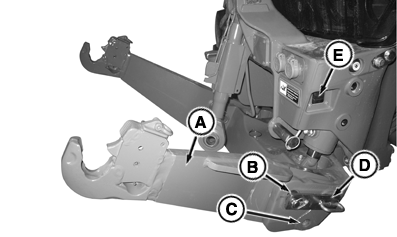
A - Lift Arm
B - Quick Lock Pin
C - Rigid Position
D - Float Position
E - Remote Hitch Switch
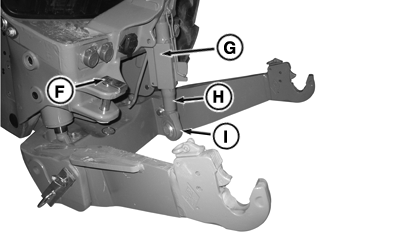
F - Quick Lock Pin
G - Locking Sleeve
H - Center Link
I - Center Link End
IMPORTANT: Use deluxe hitch only for carrier operations unless optional push bar kit is installed.
NOTE: Front hitches can only be installed on tractors ordered from factory with front hitch ready option.
Two versions of front hitch are available, deluxe, and premium.
Premium front hitch is equipped with push bar and heavier lift arms that allows carrier operations with ground engaging implements.
Front hitches with a push bar (for extra strength) maintain front axle to ground clearance for row-crop applications and can be used with ground engaging implements, including primary tillage implements and standard blades.
Deluxe front hitch should be used for carrier operations, unless push bar is installed. Convert deluxe hitch to premium hitch configuration by installing kit from John Deere™ dealers.
Lift Arm Positions
Perform following to prepare front hitch for operation:
-
Support lift arm (A) and remove quick lock pin (B).
-
Lower lift arm to align holes with hitch frame for following operations:
- Position (C) — Rigid; lift arms stable
- Position (D) — Float; allows lift arms/hitch to follow ground contours
-
Install pin and quick lock pin.
-
Repeat on opposite side.
To store lift arms, remove pins and raise lift arm into upright position. Install pin and quick lock pin in location (C).
Attaching and Detaching Implement to/from Hitch
-
 CAUTION: Avoid possible personal injury and tractor damage.
DO NOT use front hitch to lift tractor. Use correct lifting equipment.
CAUTION: Avoid possible personal injury and tractor damage.
DO NOT use front hitch to lift tractor. Use correct lifting equipment.IMPORTANT: Avoid damage to equipment. Be sure load is balanced side-to-side and front-to-rear.
Adjust implement attaching points (see implement operator's manual).
-
Lower lift arms (A) using remote hitch switch (E).
-
Position coupler ends of lift arms below implement link pins and slowly raise hitch until coupler ends lock on implement link pins.
-
NOTE: Keep center link in stored position when not in use.
Loosen locking sleeve (G).
-
Hold center link end (I) and turn center link (H) to adjust length. Tighten locking sleeve (G).
-
Remove quick lock pin (F) from storage location and attach center link (H) to implement.
Detach implement from hitch in reverse order of attaching.
NOTE:
RXA0132251-UN-13MAY13
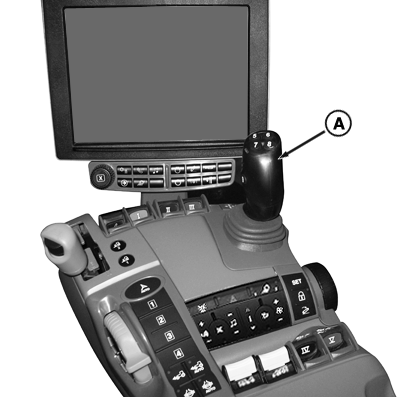
Joystick
A - Joystick
Front hitch can be operated by tractor mid-mount SCVs using electro-hydraulic joystick (A) (see Electro-Hydraulic joystick in Selective Control Valves Section in this Operator’s Manual for more information).|
TO84419,000013C-19-20140707 |