Adjusting Drawbar Length, Height and Side to Side
Adjusting Drawbar Length
RXA0129472-UN-09NOV12
RXA0085803-UN-10JAN06
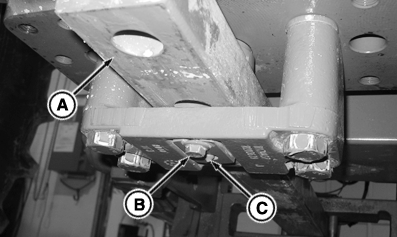
A - Drawbar
B - Cap Screw
C - Retaining Pin
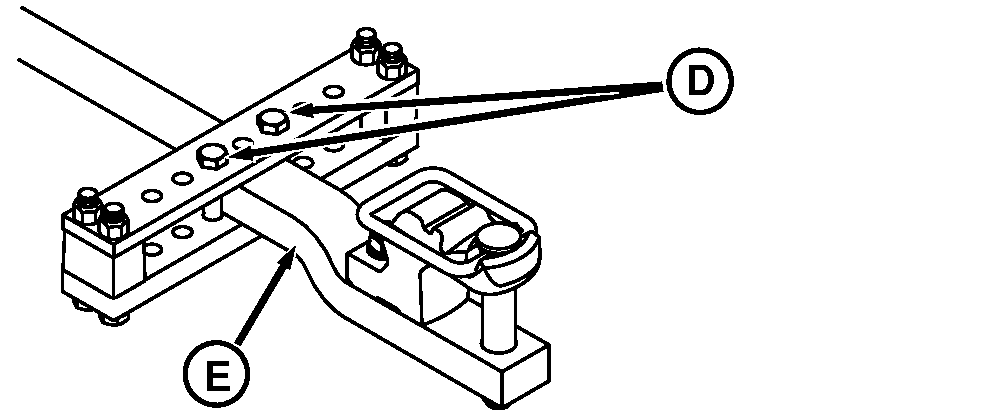
D - Locking Bolts
E - Offset
IMPORTANT: For PTO driven implement, drawbar (A) must be positioned as instructed in Attaching PTO Driven Implement in this section.
- Loosen drawbar locking bolts (D).
- Remove cap screw (B), retaining pin (C) and retaining strap.
- Slide drawbar to desired position.
-
Install drawbar retaining strap and pin.
Item Measurement Specification Retaining Cap Screws Cap Screw Torque 70 N˙m (50 lb-ft) -
Tighten drawbar locking bolts to torque specification.
Item Measurement Specification Drawbar Locking Bolts Locking Bolts Torque 430 N˙m (318 lb-ft)
Adjusting Drawbar Height
Drawbar height adjusted by turning offset (E) up or down. Adjust length. Slide drawbar fully out and turn drawbar over.
IMPORTANT: Clevis assembly must always be on top of drawbar if used.
Heavy duty support cannot be used with drawbar offset positioned upward.
Adjusting Drawbar Side To Side
- Remove drawbar locking bolts.
- Slide drawbar to desired position.
- Install a locking bolt against each side of drawbar. Tighten bolts to torque specification.
|
TO84419,000013F-19-20130725 |