PTO Engagement Rate
RXA0133713-UN-16JUL13
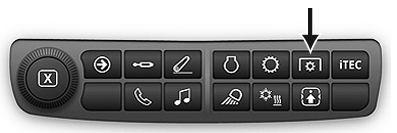
Generation 4 Shortcut Buttons
RXA0128917-UN-15MAR13
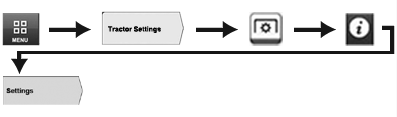
Menu → Tractor Settings Tab → PTO Icon → Information and Settings Icon → Settings Tab
RXA0130890-UN-15FEB13
RXA0130891-UN-15FEB13
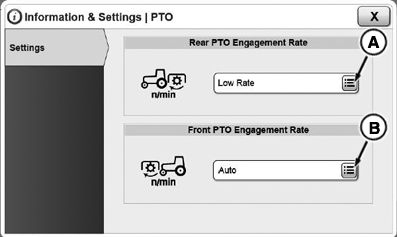
A - Rear PTO Engagement Rate Button
B - Front PTO Engagement Rate Button (If Equipped)
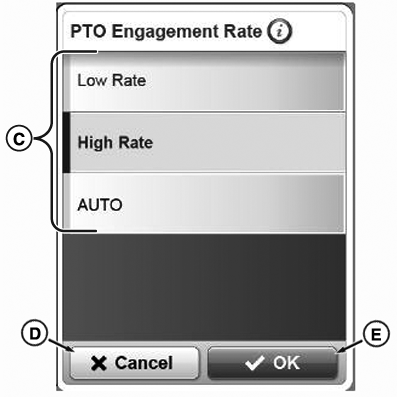
C - PTO Engagement Rate Settings
D - Cancel Button
E - OK Button
Use shortcut buttons or follow alternative path:
- Select Menu.
- Select Tractor Settings tab.
- Select PTO icon.
- Select Information and Settings icon.
- Select Settings tab.
Operator can select from three different engagement rates for both front and rear PTO: AUTO, Low, and High.
AUTO: Used for most implements, and is the factory setting in CommandCenter™. This setting provides software logic to determine engagement rate for PTO clutch, based on PTO speed sensor feedback. If PTO does not turn fast enough during initial PTO clutch engagement, engagement rate is automatically increased to avoid clutch slip and PTO shutdown.
Low: Can be used where gradual PTO startup is required, or if Auto engagement is too aggressive or inconsistent.
High: Can be used for applications where PTO clutch engagement needs to be aggressive.
IMPORTANT: If operator is experiencing problems with PTO clutch engagement in Auto setting, change PTO engagement setting in CommandCenter™ from Auto to High Rate to prevent power train damage.
|
CommandCenter is a trademark of Deere & Company |
TO84419,0000146-19-20140701 |