Remote Front PTO Switch (If Equipped)
RXA0128916-UN-26OCT12
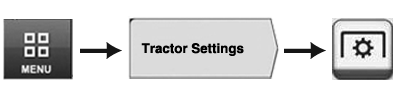
Menu → Tractor Settings Tab → PTO Icon
RXA0131638-UN-27MAR13
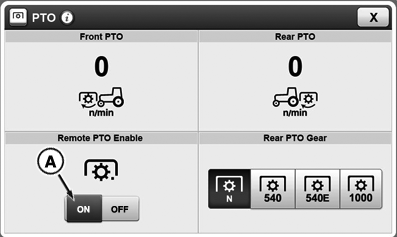
CommandCenter™ PTO Home Page
RXA0133381-UN-09JUL13
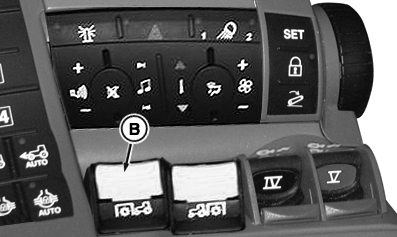
CommandARM
RXA0133386-UN-26JUL13
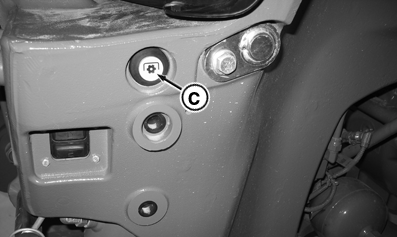
Remote Front PTO Button
A - Remote PTO Switch Enable
B - Front PTO Switch
C - Front Remote PTO Button
Front PTO can be operated from outside of cab.
-
Select Menu.
-
Select Tractor Settings tab.
-
Select PTO icon.
-
Activate Remote PTO Enable button (A) on CommandCenter™ to enable Remote Front PTO button (C).
-
Raise front PTO switch (B). An audible warning will sound and hazard warning lights will flash (PTO has not started yet).
-
Press and hold Remote Front PTO button (C). Front PTO will start slowly.
-
Press and hold button for at least 4 seconds:
- Hazard warning lights turn off
- PTO continues to operate
-
Release button within 4 seconds:
- PTO will slowly stop
- Audible warning will continue to sound
- Hazard warning lights will flash
-
Press and hold button for at least 4 seconds:
Shut off front PTO by pressing Remote Front PTO button (C) (audible warning will sound and hazard warning lights will flash)OR pull back Front PTO switch (B) inside cab. Operator must select OFF on CommandCenter™ to allow Front PTO Switch (B) to return to normal operation.
NOTE: If Front PTO is switched on in cab, Front PTO may be shut off at Remote Front PTO button. If Front PTO is switched off in cab, steps 1 through 3 must be repeated to enable Remote Front PTO button.
|
CommandCenter is a trademark of Deere & Company |
TO84419,0000149-19-20130830 |