Remote Rear PTO Switch (If Equipped)
RXA0128916-UN-26OCT12
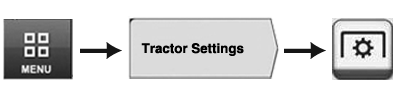
Menu → Tractor Settings Tab → PTO Icon
RXA0131638-UN-27MAR13
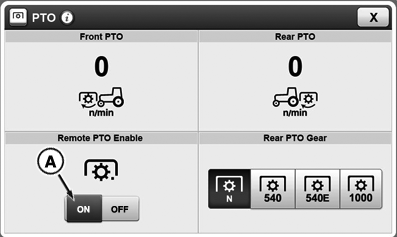
CommandCenter™ PTO Home Page
RXA0133380-UN-09JUL13
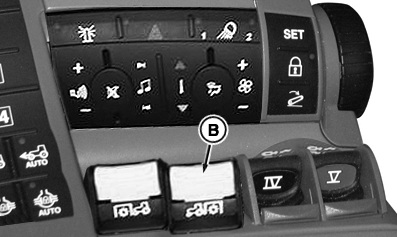
CommandARM
RXA0131099-UN-13MAR13
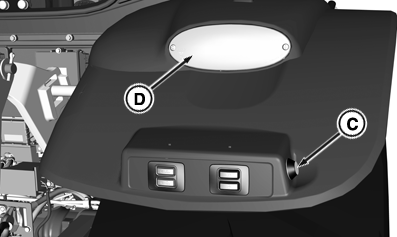
Right-Hand Rear Fender
A - Remote PTO Enable
B - Rear PTO Switch
C - Rear Remote PTO Button
D - Hazard Warning Light
Rear PTO can be operated from outside of cab.-
Select Menu.
-
Select Tractor Settings tab.
-
Select PTO icon.
-
Activate remote PTO enable button (A) on CommandCenter™ to enable rear remote PTO button (C).
-
Push down and forward on rear PTO switch (B). An audible warning will sound and hazard warning lights (D) will flash (PTO has not started yet).
-
Press and hold rear remote PTO button (C). Rear PTO will start slowly.
-
Press and hold switch for at least 4 seconds:
- Hazard warning lights (D) turn off
- PTO continues to operate
-
Release switch within 4 seconds:
- PTO will slowly stop
- An audible warning will sound
- Hazard warning lights (D) will flash
-
Press and hold switch for at least 4 seconds:
Shut off rear PTO by pressing rear remote PTO button (C) [audible warning will sound and hazard warning lights (D) will flash] OR pull back rear PTO switch (B) inside cab.
In order to restore normal function to rear PTO switch (B), deselect remote PTO enable (A).
NOTE: If rear PTO is switched on in cab, Rear PTO may be shut off at remote PTO switch. If Rear PTO is switched off in cab, steps 1 through 4 must be repeated to enable Remote Rear PTO switch.
|
CommandCenter is a trademark of Deere & Company |
TO84419,000014A-19-20130830 |