Hitch Control Lever
RXA0143179-UN-07JUL14
CommandARM™ Controls
RXA0143180-UN-27JAN15
Hitch Control Lever
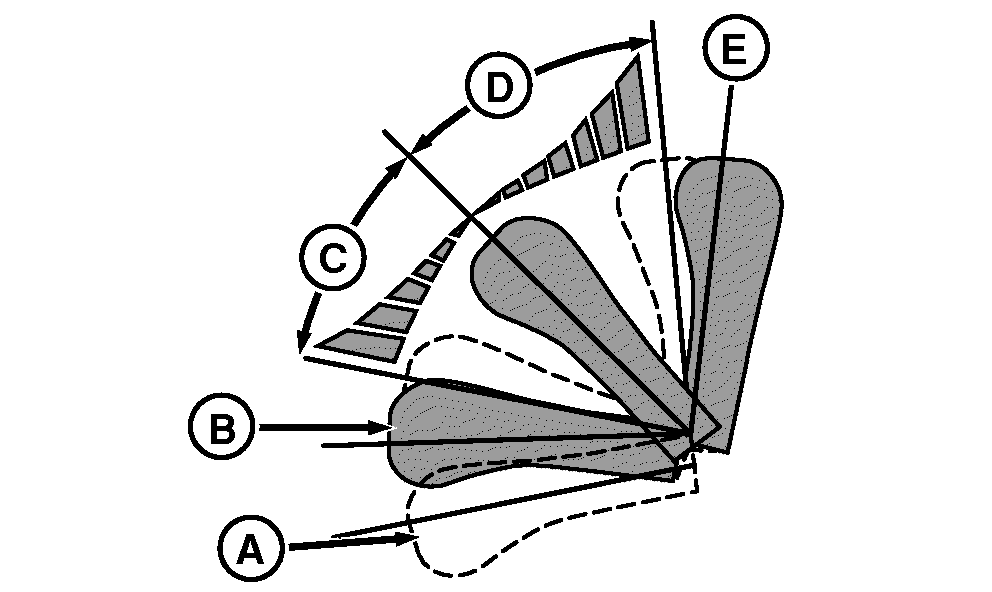
A - Float Position
B - Detent Position, Lower
C - Hitch Proportional Lower
D - Hitch Proportional Raise
E - Detent Position, Raise
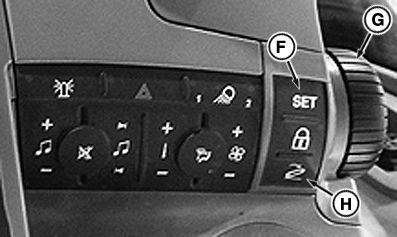
F - Set Point Button
G - Depth Adjust Hitch Dial
H - Resume Button
ProportionalMoving hitch control lever within proportional regions (C and D), changes raise or lower rate depending on how far lever is moved from center position.
Hitch control lever does not raise above upper limit, but can lower below set point.
Detents
When the hitch control lever is pulled into detent position, raise (E) and released, hitch raises to upper limit. When pushed into detent position, lower (B) and released, hitch moves to set point.
Float
Float position (A) allows for freedom of motion for hitch and is useful when detaching implement. See Float Operation in this section of this Operator’s Manual for proper setup if implement requires hitch to float during field operation.
Hitch Depth Adjust Dial
Hitch depth adjust dial can also be used to adjust hitch position. Like hitch control lever, it will not raise hitch above upper limit, but can lower hitch below set point.
Setting Depth
Use hitch control lever or depth adjust dial to move hitch to desired position, press set point button (F) to store operating depth.
Return to Stored Operating Depth
Press resume button (H) or push control lever into detent position, lower (B) and release to return to set point.
If hitch is lower than set point, returning to set point is only allowed when tractor is moving.
NOTE: Resume button (H) does not lower hitch if tractor is stationary with transmission in Park or Neutral.
|
GH15097,0000867-19-20140707 |