PTO Engagement Rate
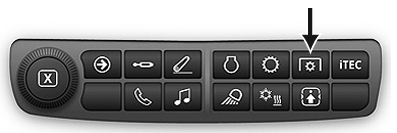
RXA0133713-UN-16JUL13
Navigation Bar PTO Shortcut Button
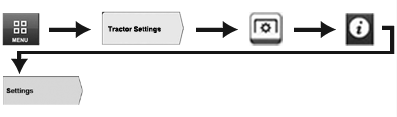
RXA0128917-UN-15MAR13
Menu Button → Tractor Settings Tab → PTO Button → Information and Settings Icon → Settings Tab
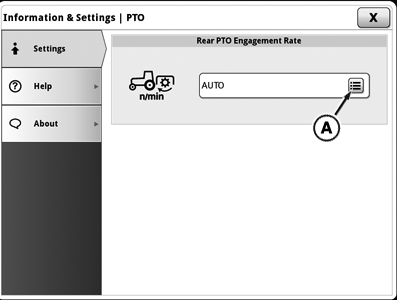
RXA0142582-UN-13JUN14
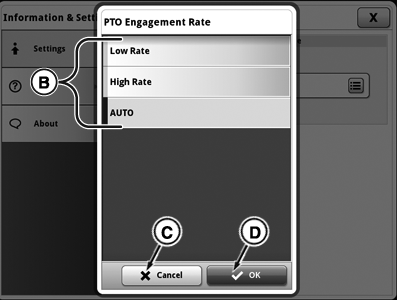
RXA0142583-UN-13JUN14
A - PTO Engagement Rate Button
B - PTO Engagement Rate Settings
C - Cancel Button
D - OK Button
Use navigation bar PTO button or follow alternative path:
- Select Menu button.
- Select Tractor Settings tab.
- Select PTO button.
- Select Information and Settings icon.
- Select Settings tab.
Operator can select from three different PTO engagement rates: AUTO, Low, and High.
AUTO: Used for most implements, and is factory setting in CommandCenter™. This setting provides software logic to determine engagement rate for PTO clutch, based on PTO speed sensor feedback. If PTO does not turn fast enough during initial PTO clutch engagement, engagement rate is automatically increased to avoid clutch slip and PTO shutdown.
Low: Can be used where gradual PTO start-up is required, or if Auto engagement is too aggressive or inconsistent.
High: Can be used for applications where PTO clutch engagement must be aggressive.
IMPORTANT: If problems with PTO clutch engagement occur in Auto setting and Under Speed Diagnostic Trouble Code is displayed, change PTO engagement setting in CommandCenter™ from Auto to High Rate to prevent power train damage.
Operating PTO with excessive load could damage PTO clutch and other components. When excessive load is detected, PTO automatically disengages. Wait 15 seconds before attempting to reengage PTO. If problem occurs during engagement, PTO speed may need to be decreased.
|
CommandCenter is a trademark of Deere & Company |
GH15097,00008D5-19-20150601 |