Install Video Display Camera
RXA0107925-UN-28MAY10
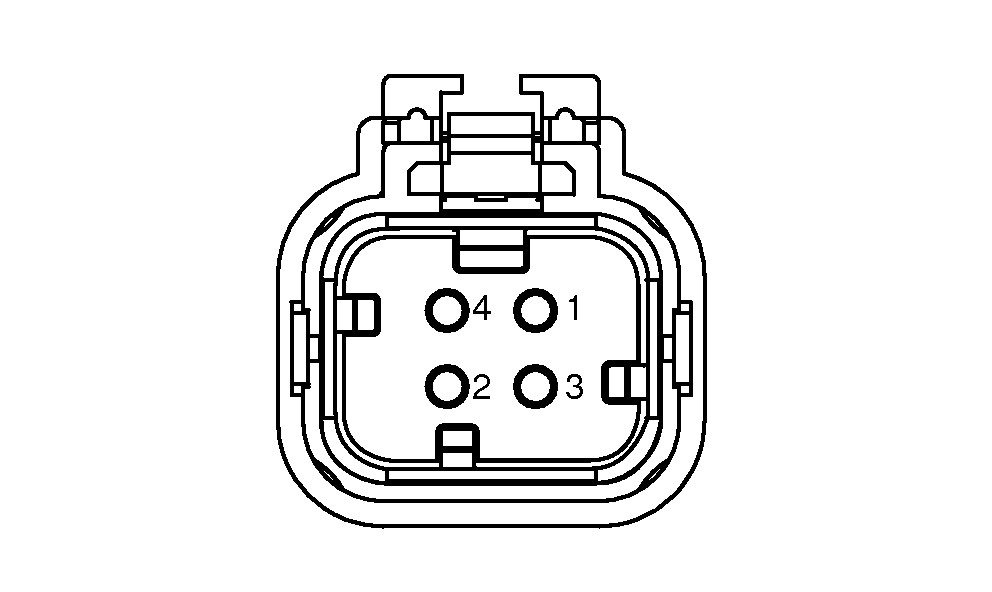
Video Connector Pin Identification
RXA0132177-UN-23APR13
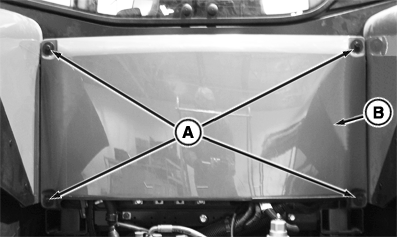
Remove Rear Panel
RXA0132178-UN-23APR13
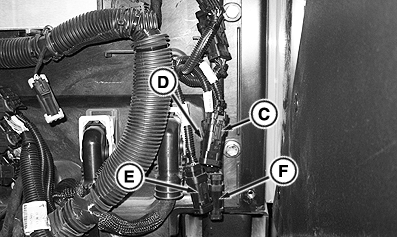
Video Connectors Location (Equipped with 4600 Processor)
A - Cap Screws
B - Rear panel
C - Video 1 Connector
D - Video 2 Connector
E - Video 3 Connector
F - Video 4 Connector
-
IMPORTANT: Avoid damaging camera by mounting camera securely to equipment and in location where camera will not be pinched, crushed, kicked, or knocked off.
NOTE: Camera placement is limited to video camera cable length. Consider camera field of view when selecting location.
Tractors equipped with 4100 processor will have one camera input connector and 4600 processor will have four camera input connectors.
Tractors are equipped with one or four, 4-pin video connector(s) to attach camera(s). Remove rear cab panel cap screws (A). Remove cab rear panel (B) to access each marked video camera connector(s) (C, D, E or F). Chart shows connector pin/function information.
Pin Number
Function
1
Power
2
Ground
3
Signal
4
Signal—Ground
-
Connect camera cable into 4-pin connectors, route cable and mount camera at desired location.
-
Install rear panel on cab and tighten screws.
-
Proceed to Video Triggers in this section of this Operator’s Manual to select camera settings.
|
KT81203,0000155-19-20141111 |