Operate HydraCushion™ Front Axle Suspension (If Equipped)
RXA0147938-UN-13APR15
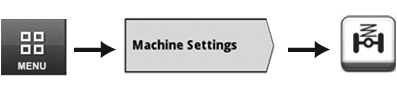
Menu → Machine Settings Tab → Suspension Icon
RXA0143564-UN-10JUL14
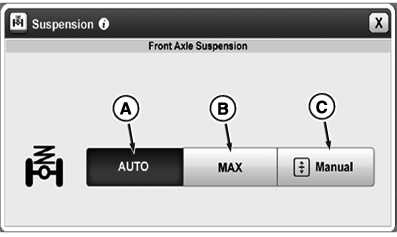
Suspension Page
RXA0139522-UN-25FEB14
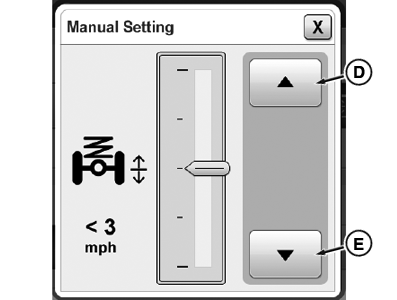
Manual Settings Page
A - Front Axle Suspension AUTO Setting Button
B - Front Axle Suspension MAX Setting Button
C - Manual Positioning Setting Button
D - Raise Button
E - Lower Button
- Select Menu.
- Select Machine Settings tab.
- Select Suspension icon.
- Select desired front axle and cab suspension setting.
HydraCushion™ Front Axle Suspension
HydraCushion™ Front Axle Suspension can be set to two different firmness levels and a manual position option: “AUTO” (A), “MAX” (B), and “Manual” (C).
Suspended front axle engages whenever tractor travel speed exceeds 0.5 km/h (0.3 mph). Control after tractor begins moving is delayed. Suspension is active anytime tractor is not in park.
- If “AUTO” (A) is selected, suspension reacts in response to surrounding conditions and events. Provides best possible comfort by looking at inputs such as travel speed, surface characteristics, implement weight, implement usage, and braking activity.
- If “MAX” (B) is selected, suspension is set to maximum hardness (e.g. for operation with a front mounted dozer blade). When travel speed exceeds 30 km/h (18 mph), “MAX” setting is deactivated. When travel speed drops below 20 km/h (12 mph), “MAX” setting is reactivated.
- If “Manual” (C) is selected, operator is able to adjust chassis height by pressing raise button (D) or lower button (E). Manual setting is overridden when travel speed exceeds 5 km/h (3 mph). When overridden, system returns to previously active mode.
Start Up Mode
- HydraCushion™ Suspension does not move until placed into either forward or reverse gear.
- HydraCushion™ suspension flexes when transmission shift lever is placed in NEUTRAL or any forward or reverse gear.
- If tractor has settled, HydraCushion™ Suspension may rise about 25 mm (1 in.) seeking to center.
- Leveling is completed when tractor wheel speed is above 0.5 km/h (0.3 mph).
HydraCushion™ Suspension in Locked Conditions (Restricted Mode)
- Operator activates hitch raise/lower switch
- Transmission shift lever placed in PARK
- Wheel speed less than 0.5 km/h (0.3 mph)
- Correcting for unlevel condition
- Operator applies both brake pedals
Hitch
- Control units limit suspension response when hitch is raised or lowered with load sense front weight changes
- Depressing clutch and moving transmission shift lever into gear for four seconds and then back to NEUTRAL adjusts suspension toward mid-point. This can be repeated until tractor levels when attaching and detaching implements.
Parking Tractor
IMPORTANT: Prevent possible damage. Do not park tractor with equipment or items under front end of tractor.
- Front end can settle when tractor is parked. Keep front end of tractor away from equipment or other items.
|
HydraCushion is a trademark of Deere & Company |
KT81203,0000177-19-20150415 |