Configuring Selective Control Valves - Access to Settings
NOTE: Low Indicators (F) on SCV page are displayed for reference when SCV is activated and hydraulic oil is following. Yellow Flow Display (G) indicates relative rate of oil flow.
Feature Mode optional connector must be configured correctly.
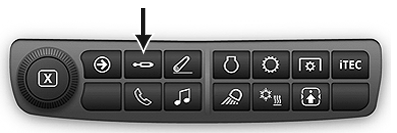
RXA0133709-UN-16JUL13
SCV Shortcut Button on Navigation Bar
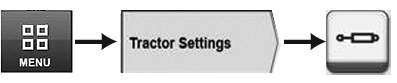
RXA0128092-UN-10SEP12
Menu → Tractor Settings Tab → SCV Icon
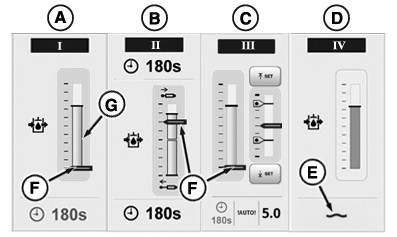
RXA0131094-UN-08AUG13
SCV Page
A - SCV Standard Mode
B - SCV Independent Mode
C - SCV Feature Mode
D - SCV Float Operation
E - Float Symbol
F - Flow Indicator
G - Flow Display
Press SCV shortcut button on Navigation Bar or follow alternative path:
- Select Menu.
- Select Tractor Settings tab.
- Select SCV icon.
Each SCV can be configured one of three different modes. Examples:
- SCV I (A) - standard mode
- SCV II (B) - independent mode
- SCV III (C) - feature mode
- SCV IV (D) - float (float symbol (E) appears)
Additionally when SCV is set to float as in SCV IV (D), float symbol (E) appears.
|
RD47322,000049C-19-20150501 |