Configuring Selective Control Valves - Independent Mode
SCVs in Independent Mode each have two detent flow setting and two detent time settings, one pair for extend and the other pair for retract.
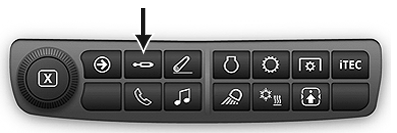
Press SCV shortcut button on Navigation Bar.
RXA0133709-UN-16JUL13
SCV shortcut button on Navigation Bar
RXA0131827-UN-19AUG13
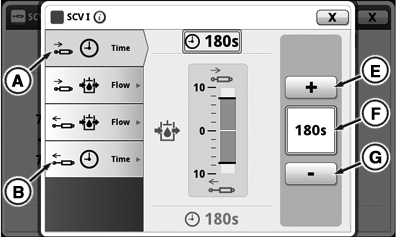
Independent SCV Detent Time Setting
RXA0131877-UN-19AUG13
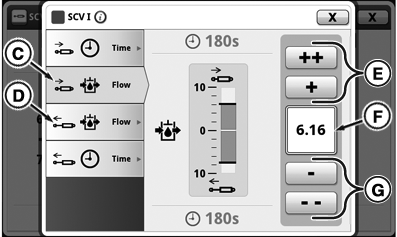
Independent SCV Detent Flow Setting
RXA0131232-UN-09MAY13
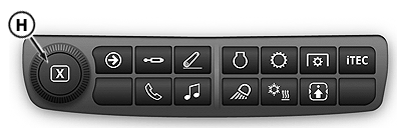
Display Shortcut Bar
A - Retract Detent Time Tab
B - Extend Detent Time Tab
C - Retract Detent Flow Tab
D - Extend Detent Flow Tab
E - Increase Time/Flow Buttons
F - Input Box
G - Decrease Time/Flow Buttons
H - Adjusting Dial
-
Select an SCV that is in Independent Mode.
-
Select Detent Time Retract tab (A) or Detent Time Extend tab (B).
NOTE: Detent time displays amount of time in input box (F). Pressing (+) increases time in 1 second increments up to 10, then increments of every 2 seconds up to 20, then increases every 5 seconds to 30, then by 30 seconds up to C for continuous and by pressing (-) decreases time setting by the same increments.
-
To increase detent time press buttons (E) or to decrease press buttons (G). Also adjusting dial (H) can be used to increase or decrease desired detent time setting.
-
Select Detent Flow Retract tab (C) or Detent Flow Extend tab (D).
NOTE: Flow is displayed in increments of 0.04 beginning at 0.04 through 10 located in input box (F). Pressing (+) increases flow by 0.04, pressing (++) increases flow by 1.00, and by pressing (-) and (- -) decreases flow setting by the same increments.
-
To increase flow press buttons (E) or to decrease press buttons (G). Also adjusting dial (H) can be used to increase or decrease flow setting.
|
RD47322,000049F-19-20150505 |