Configuring Selective Control Valves - Feature Mode
RXA0133709-UN-16JUL13
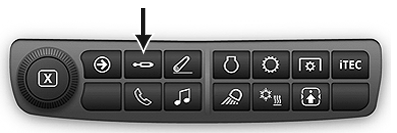
SCV shortcut button on Navigation Bar
RXA0127959-UN-21AUG13
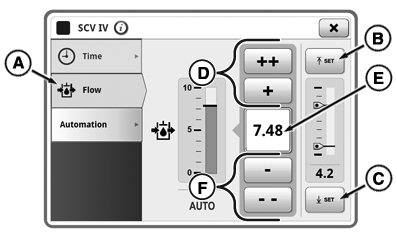
Feature SCV Settings Page
RXA0131233-UN-09MAY13
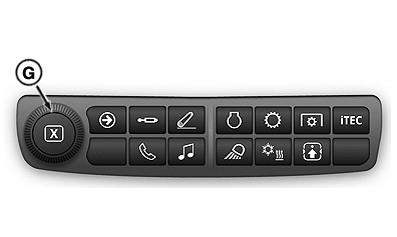
Display Shortcut Bar
A - Detent Flow Tab
B - Upper Setpoint button
C - Lower Setpoint button
D - Increase Flow
E - Input Box
F - Decrease Flow
G - Adjusting dial
NOTE: Feature mode requires an optional connector. To use feature mode, connect implement to tractor before the key switch is turned on. When connected through ISO Bus or implement connector, SCVs automatically enter feature mode. SCV page with feature option is displayed for selected SCVs.
Available feature modes:
- TouchSet™ depth control
- AccuDepth™ control
- ISOBUS control
- Laser Scraper
- Class 3 Capabilities
-
Connect tractor to implement.
-
Select Menu .
-
Select Tractor Settings tab.
-
Select SCV Icon.
-
Select Feature SCV Module.
-
Select Detent Flow tab (A).
-
To increase flow press (+ or ++) button (D) or to decrease press (- or - -) button (F). Also turning adjusting dial (G) can be used to set desired flow setting.
NOTE: Flow is displayed in increments of 0.04 beginning at 0.04 through 10 located in input box (E). Pressing (+) will increase flow by 0.04, pressing (++) increases flow by 1.00, and by pressing (-) and (- -) will decrease flow setting by the same increments.
-
NOTE: Only TouchSet™ depth control uses upper and lower setpoint buttons (B) and (C).
Select Upper Setpoint button (B) to set upper setpoint to current position.
-
Select Lower Setpoint button (C) to set lower setpoint to current position.
|
RD47322,00004A0-19-20150501 |