CommandCenter™ Pages Descriptions and Functions
iTEC™ Main Page
RXA0133714-UN-16JUL13
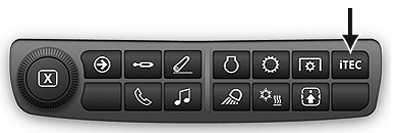
ITEC™ Shortcut Button on Navigation Bar

RXA0145566-UN-01OCT14
Menu → Machine Settings Tab → iTEC™ Icon
RXA0131995-UN-23APR13
iTEC™ Main Page
Use shortcut buttons or follow alternative path:
- Select Menu.
- Select Machine Settings tab.
- Select iTEC™ Icon.
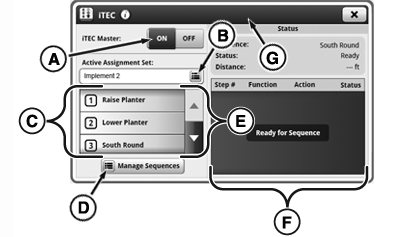
- A — iTEC™ Master Toggle: Toggle iTEC™ ON/OFF.
- B — Active Assignment Set Button: Select or create an assignment set.
- C — Assignments List: List of sequences assigned to iTEC™ buttons.
- D — Manage Sequences Button: Edit sequence and assign buttons.
- E — Scroll Bar: Scroll up or down.
- F — Status List: Shows status of each iTEC™ sequence step as sequence progresses.
- G — Title Bar: Press Title Bar to access application title, help button, and advanced settings (if applicable).
|
iTEC is a trademark of Deere & Company |
SV81855,000002E-19-20160404 |