Exit Lights
RXA0147935-UN-13APR15
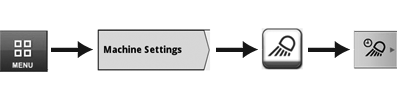
Menu → Machine Settings Tab → Lights Icon → Exit Lighting Tab
RXA0142960-UN-08JUL14
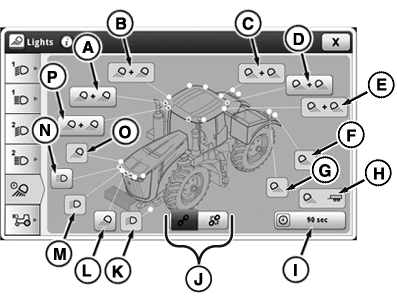
Exit Lights Page
RXA0142961-UN-25JUN14
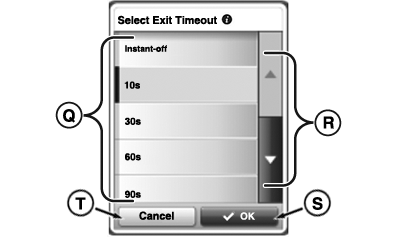
Exit Timeout Selection
A - Front Outer Roof Lights Button
B - Front Side Roof Lights Button
C - Rear Inner Roof Lights Button
D - Rear Outer Roof Lights Button
E - Rear Side Roof Lights Button
F - Rear Outside Fender Lights Button
G - Rear Inner Fender Lights Button
H - Implement Lights Button
I - Exit Light Timeout Button
J - Link/Unlink Toggle
K - Road (Low and High Beam)/Clearance Lights Button (European tractors only)
L - Inner Hood Lights Button
M - Low Beam Hood Lights Button
N - High Beam Hood Lights Button
O - Outer Hood Lights Button
P - Front Inner Roof Lights Button
Q - Time Selection Interval List
R - Scroll Bar
S - OK Button
T - Cancel Button
Programming delay lighting allows operator to select which lights will remain on and for how long they will remain on after light selector knob is turned to OFF position.
Field exit lighting is all lights chosen on exit lighting page and will be activated for time selected for Exit Timeout. Field exit lighting will be enabled when light switch has been in “Field” position for at least 10 seconds during the current key switch cycle. Field exit lighting will then be activated when light switch and key switch are turned off. The order which the light switch and key switch are turned off do not matter.
Road exit lighting is all lights chosen on exit lighting page and will be activated for time selected for Exit Timeout. Road exit lighting will be enabled when light switch has been in “Road” position for at least 10 seconds during the current key switch cycle. Road exit lighting will then be activated when light switch and key switch are turned off. The order which the light switch and key switch are turned off do not matter.
- Select Menu.
- Select Machine Settings tab.
- Select Lighting icon.
- Select Exit Lighting tab
- Select desired lights and deselect unwanted lights. Use Link/UnlinkToggle (J) if operator wishes to select a set (link) or only select the right or left light in a set (unlink) where applicable. Lights F-G and K-O are always linked and will always select both the left and right lights.
- Select Exit Light Timeout button (I).
- When options appear, select desired time intervals (Q) before lights automatically turn OFF and select OK button (S).
|
SV81855,00000DB-19-20150423 |