Execute Sequence
RXA0137808-UN-22JAN14
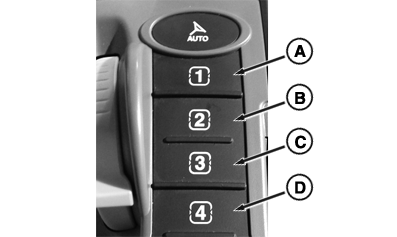
CommandARM™ Sequence Buttons
RXA0131148-UN-02OCT13
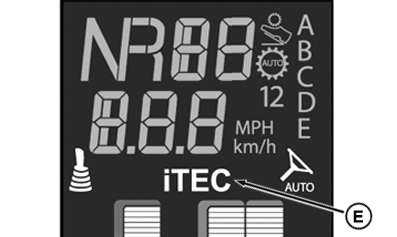
Corner Post Display
RXA0131608-UN-26MAR13
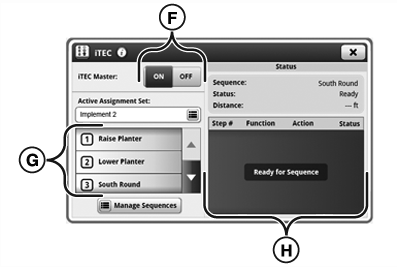
iTEC™ Main Page
A - Sequence Button 1
B - Sequence Button 2
C - Sequence Button 3
D - Sequence Button 4
E - iTEC™ Indicator
F - Master Toggle
G - Assignment List
H - Status Area
iTEC™ sequence execution requires certain tractor controls be operated in a particular way. Sequence will NOT execute with tractor in PARK position. Shift lever must be in forward position when executing set speeds, gears, or Automatic Gear Shift. Tractor ground speed must be at least 0.5 km/h (0.31 mph).
If a PTO function is included in sequence, PTO must be engaged manually, using PTO switch, for initial engagement. Before performing sequence using SCV functions, relevant SCV levers must be in neutral position.
Abort current sequence at any time by again pressing same iTEC™ Sequence button (A-D) used for starting sequence. Currently active commanded functions will be canceled (for example, hitch motion or SCV flow will stop if previously initiated as part of sequence).
During sequence execution, a function can be actuated manually at any time without execution of sequence being interrupted. Functions that are actuated manually are ignored by iTEC™ for the rest of sequence. Relevant alert icon for this function appears in Status Area (H).
- Turn iTEC™ Master Toggle (F) to ON position.
- Select iTEC™ Sequence button (A-D) on CommandARM™ for desired sequence.
- Sequence steps appear in Status Area (H) and shows progression of steps.
|
iTEC is a trademark of Deere & Company CommandARM is a trademark of Deere & Company |
SV81855,0000104-19-20160824 |