Tractor-Implement Automation™ — Status Page
LX1057101-UN-23JUL13
LX1057102-UN-23JUL13
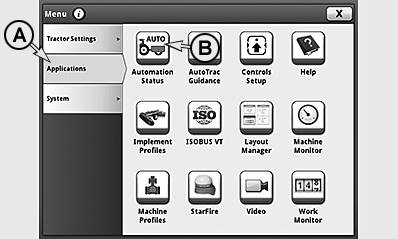
A - Applications Tab
B - Automation Status Icon
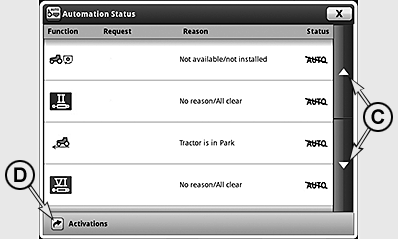
C - Scrollbar
D - Activating Tractor Implement Automation™ Button
Access CommandCenter™ Menu and select tab (A).Press Automation Status icon (B) and access automation status page.
On the status page, the status of all the functions available for TIA™ are displayed.
If no TIA™-capable implement is connected, only a text message appears on the display.
If there are too many functions to display on one status page, scrollbar (C) can be used to change to the next or previous pages respectively.
To activate the implements, press activating TIA™ button (D) and access the page for activating the implements. See also TIA™ - Activating the Implements in this section of this Operator’s Manual.
The status page has four columns:
|
Function |
Auto/Command |
Cause |
Status |
|---|---|---|---|
|
All functions available for TIA™ displayed |
•Current command from implement appears on display if function is in auto mode and implement is commanding function. |
• No Reason/All clear - function is fault-free and can be automated by implement. •Brief text - function is not ready to perform commands from implement. |
• AUTO -function is currently commanded and has no threshold. • AUTO -function is currently not controlled by implement or cannot be controlled by it. Operator has control, or must enable function. • !AUTO! -function currently has a fault. Cause is displayed in a brief text in second column. • AUTO↑ -function has an upper threshold. Command from implement is too high. • AUTO↓ -function has a lower threshold. Command from implement is too low. |
|
Tractor Implement Automation is a trademark of Deere & Company CommandCenter is a trademark of Deere & Company TIA is a trademark of Deere & Company |
SV81855,000016F-19-20160317 |