Transmission Calibration
WHEN TO CALIBRATE
- A clutch solenoid or valve is replaced.
- Shift quality has degraded.
- Transmission filters are replaced.
- Transmission hydraulic fluid is changed.
- Transmission system control unit (PTP) is replaced.
- Transmission is removed for maintenance or replaced for any reason.
Transmission calibration is recommended for any of the following reasons:
CHECK OIL LEVEL AND WARM-UP PROCEDURE BEFORE CALIBRATION
-
Check oil level sight gauge in hydraulic oil reservoir. Oil level should be between Full Cold (A) and Min. Cold (B) marks.
-
NOTE:
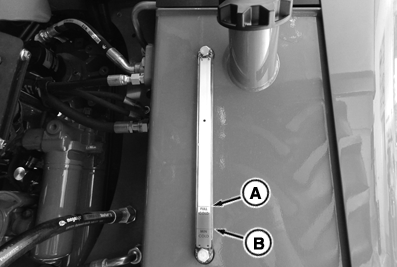
RXA0142195-UN-10JUN14Hydraulic Oil Reservoir
A - “Full Cold” Mark
B - “Min Cold” Mark
Only calibrate transmission if shift characteristics change after transmission oil and filter change.Do not perform oil check soon after transporting tractor in 15th or a higher gear.
IMPORTANT: Poor shift quality or transmission damage may occur if incorrect transmission-hydraulic oil is used. See Transmission-Hydraulic Oil in Fuel, Lubricants and Coolant section of this Operator’s Manual.
Heat hydraulic oil. See Warm-Up Transmission-Hydraulic System in Operating the Tractor section of this Operator’s Manual.
-
When oil is at desired temperature, drive to a level surface.
NOTE: DO NOT depress brake pedal during this portion of oil warming procedure. If brake pedal is depressed, additional oil will flow to axles and result in inaccurate oil level reading.
-
Shift transmission lever to PARK. Set engine speed at 1800 rpm and run for 5 minutes.
IMPORTANT: Do not operate tractor if oil level is below “Min Cold” mark (B) in sight gauge with engine off.
NOTE: Reduce engine speed to slow idle, shut engine OFF, and wait 5 minutes for oil to stabilize.
-
 CAUTION: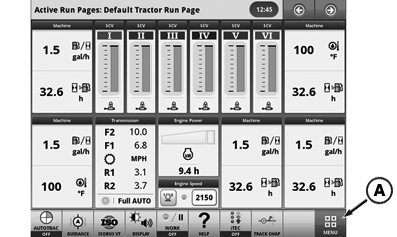
RXA0142149-UN-10JUN14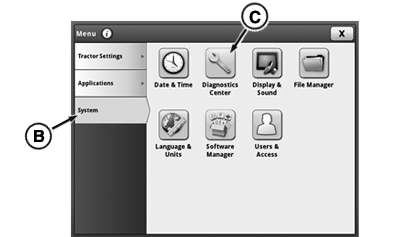
RXA0142150-UN-10JUN14Message Center
A - Menu Button
B - System Tab
C - Dianostics Center Icon
Perform transmission calibration with tractor in an open, outdoor area on flat ground. Do not permit others near tractor during procedure.Verify park brake is functioning properly.
While calibrating, remain in the operator's seat. Depending on transmission-hydraulic oil temperature at start of procedure, calibration typically takes 12-15 minutes.
IMPORTANT: Serious damage to transmission may result if oil level is inadequate.
Make sure Efficiency Manager™ is disabled.
-
Press the Menu button (A) and select System Tab (B).
-
Select Diagnostic Center Icon (C).
-
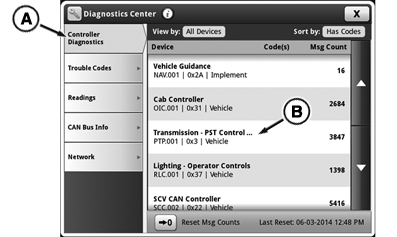
RXA0142151-UN-10JUN14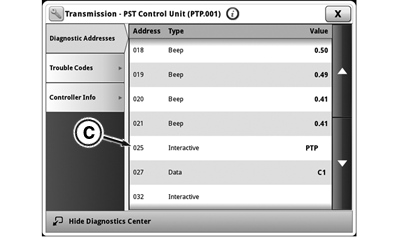
RXA0142152-UN-10JUN14A - Controller Diagnostics Tab
B - Transmission-PST Control
C - 025
Select Controller Diagnostics Tab (A). -
Select Transmission-PST Control (PTP.001) (B) from list.
-
Select Address 025 in drop down menu.
CAUTION: Leave shift lever in Park. Placing shift lever in F
or R will result in tractor movement. -
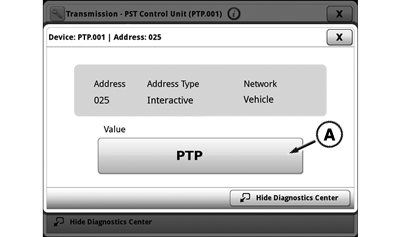
RXA0142153-UN-10JUN14A - PTP Button
PTP should appear on Secondary Display Unit display. Press on PTP button (A).IMPORTANT: Do not leave seat. Operator presence must be detected in this step to allow calibration to continue.
-
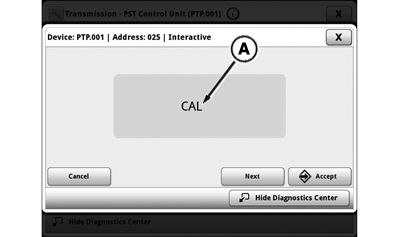
RXA0142154-UN-10JUN14A - CAL
If CAL (A) should appear on Secondary Display Unit display, transmission calibration is ready to begin. -
Adjust throttle to 1650 engine rpm.
-
IMPORTANT: If "P" is NOT displayed on corner post display, do no proceed with calibration. Leave shift lever in PARK. Lever movement to F position will result in unintended tractor movement. Return to Step 2.
Move shift lever to N position. P should be displayed on the corner post PDU display.
-
Move shift lever to F position to start calibration.
-
If CLD appears, transmission oil temperature has dropped to less than 50° C (122° F) PTP will halt calibration until temperature has increased sufficiently to allow calibration to restart. If oil temperature (available in PTP Address 33) is more than a few degrees below 50° C (122° F), manually heat oil.
-
NOTE: Once calibration begins, do not manually change throttle position, move shift lever, or depress clutch pedal. Calibration will be aborted.
NOTE: If calibration aborts due to a fault (i.e. no engine or transmission activity is heard for a period of 30 seconds or longer), a three-letter fault message will be displayed. Record code. Another calibration attempt may be made if desired. See Aborting Transmission Calibration in this section of this Operator’s Manual.
RXA0142193-UN-10JUN14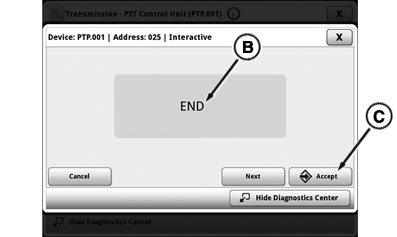
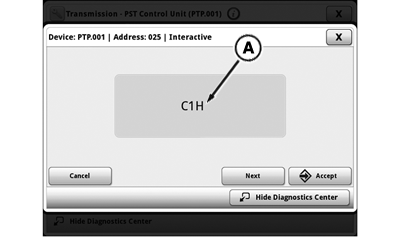
RXA0142194-UN-10JUN14A - C1H
B - End
C - Accept Button
When calibration starts, C1H (A) appears. C1H indicates Clutch 1 Hold calibration is in progress. As calibration continues, clutch hold calculations for clutches C2, CR, CA, CB, CC, CL, CM and CH follows. Display indicates which step is being performed during process. -
When all nine clutch hold stage calibrations are complete, C1F displays as next phase of calibration begins. C1F indicates that Clutch 1 Fill time calibration is in progress. As calibration continues, clutch fill calculations for clutches C2, CR, CA, CB, CC, CM, and CH follows. Display indicates which step is being performed during process.
-
When END (B) appears, calibration is complete.
NOTE: Use correct calibration exit procedure to avoid generating unnecessary Diagnostic Trouble Codes (DTC’s).
-
Move shift lever from F to PARK.
-
Throttle down.
-
Press Accept button (C) to save and exit calibration
NOTE: Display shows instructions for operator and malfunctions that have occurred. if a malfunction is displayed during calibration, new data is not stored.
-
Turn the engine off. PTP will store new calibration.
|
Calibration Fault |
Meaning |
Instruction |
|
CLD |
Transmission oil is below 50° C (122°F). Automatic warm-up is in progress. |
No action required. Wait for automatic warm-up to warm oil to 50° C (122°F). Calibration begins automatically once temperature is reached. |
|
OIL |
Transmission oil temperature is below minimum temperature of 10° C (50°F) to begin automatic warm-up. |
Manually heat hydraulic oil to 50° C (122°F). See manual Warm-up for Calibration at beginning of this section. |
|
SPD |
Engine speed is not within required range of 1600-1700 rpm to begin or continue calibration. |
Set engine speed to 1650 rpm. |
|
CLU |
Clutch pedal is not UP or was depressed by operator during calibration. |
Make sure that clutch pedal is fully UP, and do not depress during calibration. |
|
NOP |
Operator is not in seat when calibration is initiated. |
Remain seated during transmission calibration. |
|
FLT |
Transmission oil filters are restricted. |
Replace transmission filters. Retry calibration after filter replacement. |
|
Efficiency Manager is a trademark of Deere & Company |
SV81855,0000256-19-20151117 |