Select Radio Source with Generation 4 CommandCenter™
RXA0133718-UN-16JUL13
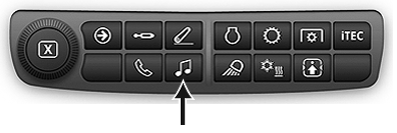
Audio Shortcut Button on Navigation Bar
RXA0147929-UN-13APR15
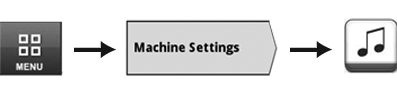
Menu → Machine Settings Tab → Audio Icon
RXA0132517-UN-15MAY13
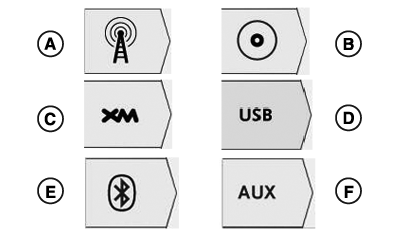
Source Select Tabs
A - FM, AM, and Weather Tab
B - CD/MP3 Tab (Premium Radio Only)
C - XM Tab (Premium Radio Only)
D - USB Tab (Premium Radio Only)
E - Bluetooth® Audio Tab (Premium Radio Only)
F - Auxiliary Tab
Use radio source tabs on Generation 4 CommandCenter™ to select radio source.
When radio is on, radio page navigates to home page of current source selected. When radio is off, content blocker displays.
NOTE: Selecting radio source will not turn radio on. Turn radio ON by pressing ON/OFF button on radio faceplate.
To access audio main page, use Audio Shortcut Button on Navigation Bar or follow alternative path:
- Select Menu.
- Select Machine Settings tab.
- Select Audio icon.
- Select desired radio source.
|
Bluetooth is a trademark of Bluetooth SIG CommandCenter is a trademark of Deere & Company |
TO84419,0000086-19-20150414 |