Premium Radio Bluetooth® Home Page (If Equipped)
RXA0132504-UN-28JUN13
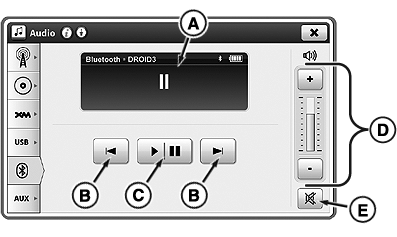
Bluetooth® Home Page
NOTE: Refer to Select Radio Source with Generation 4 CommandCenter™ in this section of this Operator’s Manual, to learn how to navigate to Bluetooth® home page.
Connect Bluetooth® enabled device to play stored music.
Radio system is equipped with Bluetooth®, which allows data transfer between radio system and paired close-range Bluetooth® device such as cell phone. Music stored on device does not transfer to CommandCenter™
A—Display Area: Displays current Bluetooth® activity/information.
B—Next/Previous Track: Skip back to beginning or ahead to beginning of next track. Press previous button twice to skip to previous track.
C—Play/Pause: Play or pause track.
NOTE: Not all devices support pause function. Devices may mute sound, but not pause play.
D—Volume Adjustment: Adjust volume.
E—Mute: Silence sound.
|
Bluetooth is a trademark of Bluetooth SIG CommandCenter is a trademark of Deere & Company |
TO84419,000008B-19-20140710 |