Contact List
RXA0147931-UN-13APR15
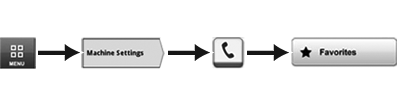
Menu → Machine Settings Tab → Phone Icon → Favorites Button
RXA0132498-UN-28JUN13
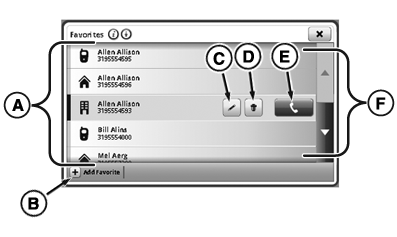
Phone Favorites Page
RXA0132499-UN-28JUN13
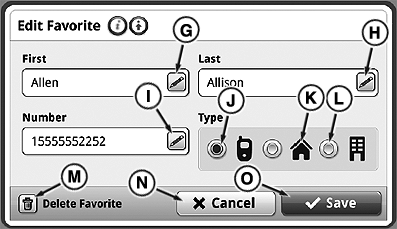
Edit Favorite Page
- Select Menu.
- Select Machine Settings tab.
- Select Phone icon.
- Select Favorites button.
NOTE: Device’s phone book synchronizes with radio, not CommandCenter™. Contacts must be added and edited manually on display.
Maximum number of phone numbers that can be stored in CommandCenter™ is 25. Maximum number of characters in phone number is 21.
NOTE: Favorites are stored permanently and can be viewed by any operator. Clear favorites before leaving tractor, if necessary. For more information, see Clear Favorites and Call History is this section of this Operator’s Manual.
A—Favorite List: List of available contacts.
B—Add Favorite Button: Select to add contact manually
C—Edit Favorite Button: Select to edit current contact.
D—Delete Button: Select to delete contact from favorites.
E—Call Button: Select to call currently selected contact.
F—Scroll Bar: Select to scroll up or down.
G—Edit Favorite First Name: Select to edit first name.
H—Edit Favorite Last Name: Select to edit last name.
I—Edit Favorite Phone Number: Select to edit phone number.
J—Mobile Phone Button: Select to list contact information under mobile phone.
K—Home Phone Button: Select to list contact information under home phone.
L—Work Phone Button: Select to list contact information under work phone.
M—Delete Favorite Button: Select to delete contact.
N—Cancel Button: Select to cancel edits.
O—Save Button: Select to save edits.
|
CommandCenter is a trademark of Deere & Company |
TO84419,000008E-19-20150414 |