Warm-Up Transmission-Hydraulic System
Set Detent Time
RXA0142308-UN-09JUN14
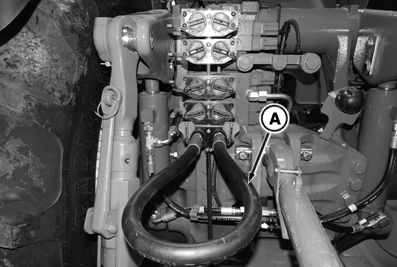
Install Jumper Hose Into SCV Coupler
RXA0141641-UN-22MAY14
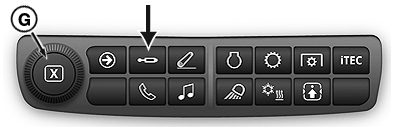
SCV Shortcut Button and Adjustment Dial on Navigation Bar
RXA0127834-UN-24AUG12
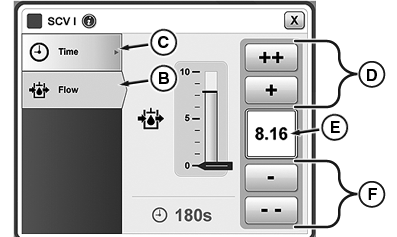
SCV Detent Time
A - Jumper Hose
B - Detent Flow Tab
C - Detent Time Tab
D - Increase Time Button
E - Input Box
F - Decrease Time Button
G - Adjustment Dial
IMPORTANT: Avoid operating tractor under load until transmission-hydraulic system has warmed up. Tractor-hydraulic warm-up procedure is recommended at temperatures at or below -5 °C (23 °F).
-
Install jumper hose (A) into SCV I couplers.
-
Place transmission lever in PARK position before starting tractor.
-
Turn key switch to START position.
-
Press SCV Shortcut Button on Navigation Bar.
-
Select SCV I module.
-
Select SCV I Time tab (C).
-
Select increase (+) button (D) to extend flow time to C (continuous) in input box (E). Adjustment dial (G) can also be used to increase or decrease desired detent time setting.
-
Set SCV II to C using steps 5 through 7.
Set Detent Flow
RXA0131683-UN-28MAR13
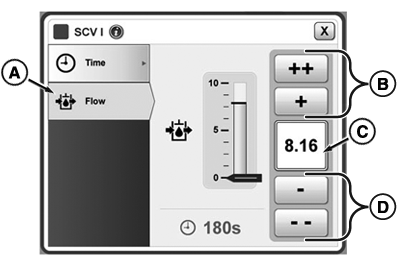
SCV Detent Flow
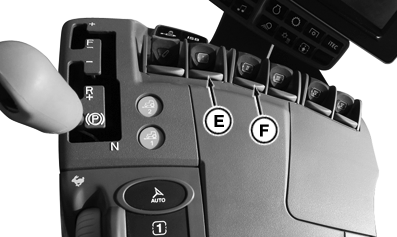
RXA0142612-UN-16JUN14
CommandArm™
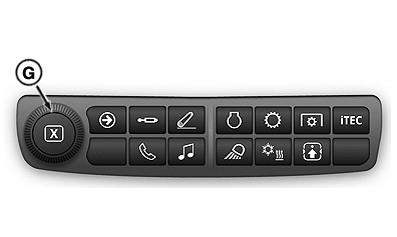
RXA0131233-UN-09MAY13
Adjustment Dial on Navigation Bar
A - SCV 1 Flow Tab
B - Increase Flow buttons
C - Flow Input Box
D - Decrease Flow buttons
E - SCV I Lever
F - SCV II Lever
G - Adjustment Dial
NOTE: Flow is displayed in increments of 0.04 beginning at 0.04 through 10 located in input box (C). Pushing (+) increases flow by 0.04, pushing (++) increases flow by 1.00, and by pushing (-) and (- -) decreases flow setting by same increments.
-
Select SCV I flow tab (A).
-
Set SCV I flow to 8.00 or above (C) by pressing buttons (B) to increase flow or buttons (D) to decrease flow setting. Adjustment dial (G) can be used to increase or decrease desired detent flow setting.
-
Pull SCV I (E) and SCV II (F) levers to extend detent.
-
Operate engine at 1400 rpm.
Monitoring Hydraulic Oil Temperature
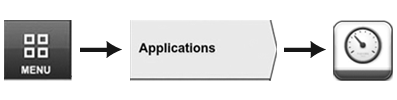
RXA0126813-UN-12JUN12
Menu → Applications Tab → Machine Monitor Icon.
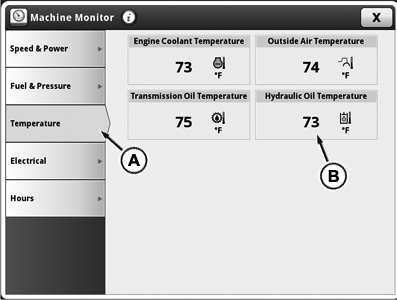
RXA0142554-UN-12JUN14
Temperature Display on Machine Monitor Page
A - Temperature Tab
B - Hydraulic Oil Temperature Reading
- Select Menu.
- Select Applications tab.
- Select Machine Monitor icon.
- Select Temperature tab (A).
- Select hydraulic oil temperature reading (B) and monitor until temperature reaches 38 °C (100 °F).
- Return SCV I and SCV II lever to neutral position.
- Disconnect jumper hose and return to normal operation.
|
TO84419,00003A0-19-20140709 |