DEF Header Filter—Final Tier 4 or Stage IV Engine
Always use DEF as specified in Diesel Exhaust Fluid (DEF) section of this Operator’s Manual.
Reduce damage and poor performance issues with DEF system. DEF header filter protects system from low quality or contaminated DEF. Replace as required.
A blocked DEF header filter is one of several possible problems which will cause listed (diagnostic Trouble Codes) DTC messages to appear.
- ECU4334.01 - Dosing Unit Pressure Extremely Low
- ECU4334.18 - Dosing Unit Pressure Moderately Low
- Stop tractor and place transmission into park.
- Disconnect (—) battery cable
-
Remove battery compartment cap screws (A).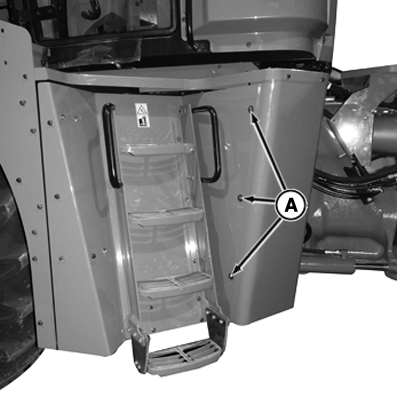
RXA0142092-UN-04JUN14 -
Open battery compartment door (B).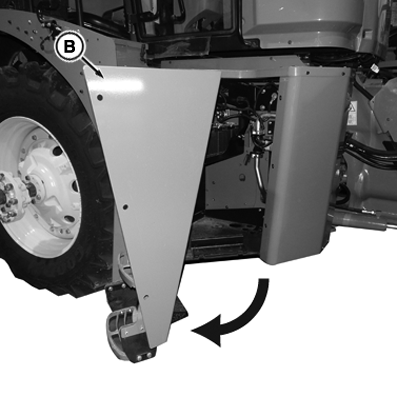
RXA0142093-UN-04JUN14 -
Disconnect electrical connector (C).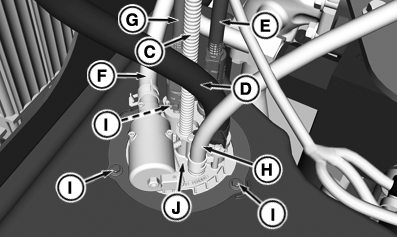
RXA0160767-UN-30AUG17 - Disconnect lines and hoses (D—H).
- Remove cap screws (I) and header assembly (J).
-
 Avoid contact with eyes. In case of contact, immediately
flush eyes with large amounts of water for a minimum of 15 minutes.
Reference the Materials Safety Data Sheet (MSDS) for additional information.
Avoid contact with eyes. In case of contact, immediately
flush eyes with large amounts of water for a minimum of 15 minutes.
Reference the Materials Safety Data Sheet (MSDS) for additional information.If DEF is spilled or contacts any surface other than the storage tank, immediately clean the surface with clear water. DEF is corrosive to painted and unpainted metallic surfaces and can distort some plastic and rubber components.
Spilled DEF, if left to dry or if only wiped away with a cloth, leaves a white residue. Improperly cleaned DEF spill can interfere with diagnosis of Selective Catalytic Reduction (SCR) system leakage problems.
Clear all debris from area around DEF tank header.Cap and plug all lines and fittings to prevent contamination. Coolant in DEF causes Selective Catalytic Reduction (SCR) system performance issues.
Mark all hoses and wires prior to removal.
- Remove DEF tank header, inspect O-ring for damage, replace if necessary.
- Remove cap screws from DEF tank header locking ring.
-
Remove DEF header filter retaining screw (K).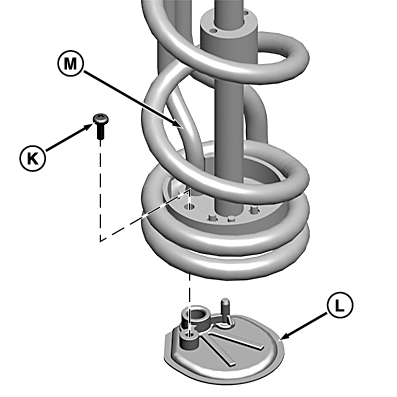
RXA0160768-UN-30AUG17 -
Retain old filter after removal. Filter must be inspected for contamination later in this procedure.
Remove filter (L) from suction tube (M). - Install filter (L).
- Install screw (K) and tighten to specification.
DEF Suction Screen Screw—Torque 1 N·m (11 lb·in) - Lubricate O-rings with clean DEF.
-
Prevent DEF leak by aligning notches on locking ring with plastic tabs on header.
Install stainless steel cap screws into mounting holes and tighten to specification.DEF Tank Header Cap Screw—Torque 9 N·m (80 lb·in) Push DEF line onto fitting until you hear a “click” is heard. Then lightly pull back to ensure that it is connected and locked it in place.
DEF supply and return lines have unique sized fittings.
-
Plugged DEF header filter may indicate that dosing unit filter is also plugged.
Examine header filter. If filter is plugged with contaminants go to step 18. If not plugged, go to step 23. - Change DEF dosing unit filter. See Dosing Unit Filter in this Operator's Manual section.
- Check DEF tank for contaminated DEF. See Testing Diesel Exhaust Fluid (DEF) in Diesel Exhaust Fluid (DEF) section of this Operator's Manual.
- If DEF is contaminated, drain and clean DEF tank. See Diesel Exhaust Fluid (DEF) Tank in Service - Clean section of this Operator's Manual.
- Check stored DEF supply. See Testing Diesel Exhaust Fluid (DEF) in Diesel Exhaust Fluid (DEF) section of this Operator's Manual.
-
Header Assembly Cap Screws (X) need to be hand tightened to avoid damage to header assembly.
Install header assembly (N) and header assembly cap screws (O). Tighten to specification.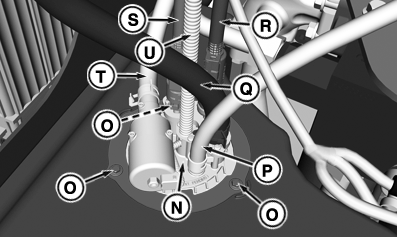
RXA0160769-UN-30AUG17Battery Compartment Cap Screws Torque 8 N·m (71 lb·in) - Connect lines and hoses (P—T).
- Connect electrical connector (U).
-
RXA0160770-UN-30AUG17
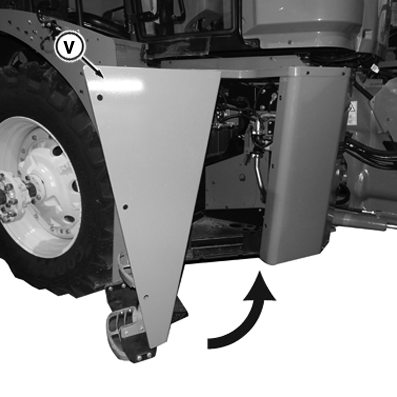
Close battery compartment door (V).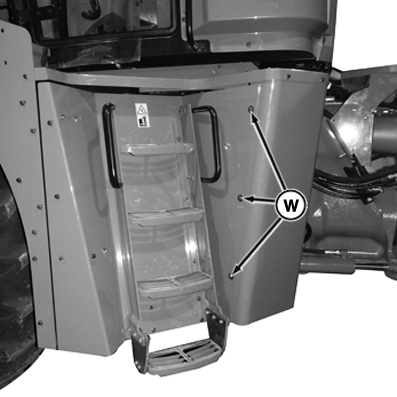
RXA0160771-UN-30AUG17 - Install battery compartment cap screws (W). Tighten to
specification.
Battery Compartment Cap Screws Torque 73 N·m (54 lb·ft) - Connect (—) battery cable.
-
If DTC message reappears, filter may not have been causing problem that generated code.
Start and run tractor. If either DTC appears, header filter was not problem. See your John Deere dealer.
|
BH38674,0000BF4-19-20170831 |