Navigate Generation 4 CommandCenter™
Images are reference and may differ by tractor configuration or operator settings. As operator pages through CommandCenter™, more in- depth information is presented, allowing operator to fine tune tractor functions.
RXA0130496-UN-09APR13
CommandCenter™ and CommandARM™
RXA0137128-UN-19NOV13
Run Page
RXA0137084-UN-13DEC13
Module Functions
Navigating CommandCenter™ Pages
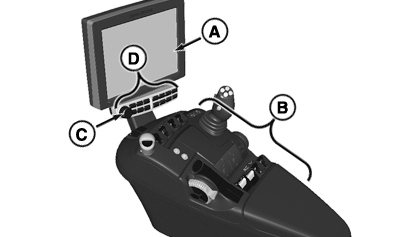
Use Touch Screen CommandCenter™ buttons or icons to make selection. For input boxes use either key pad, or select input box and scroll adjustment dial (C) to desired value. Yellow highlight box appears around selected input box and indicates adjustment dial is active.
A—CommandCenter™: attached to CommandARM™ (B), allows operator to view selected pages required to operate tractor. Display is Touch Screen, allowing operator to touch options on screen to move through pages and access tractor functions.
B—CommandARM™: made up of buttons, joystick (if equipped), switches, and shortcuts allowing operator to manage tractor or implement functions.
C—Adjustment Dial/Close Window Button: allows operator to change values in input boxes. Rotating adjustment dial clockwise raises input box values. Rotating adjustment dial counterclockwise lowers input box values. Push button one time to close window. Push and hold to close all open windows.
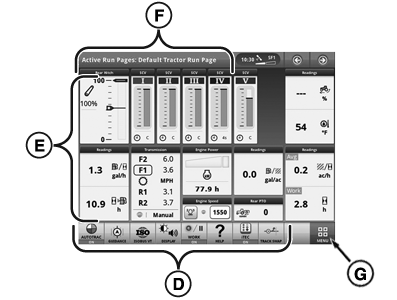
D—Shortcut Keys/Buttons: allow operator to access specific functions without going through CommandCenter™ menu.
E––Run Page Modules: allow quick access to functions.
F––Title Bar: select on any run page for drop-down bar to change run page.
G—Menu: lists all applications installed on display and machine. Select left-hand tabs to view different groups of applications.
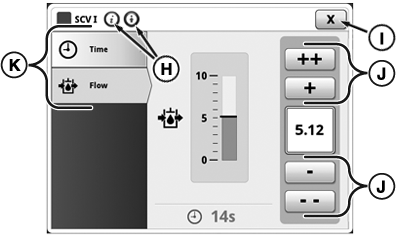
H—Help/Advanced Settings Buttons: press title bar, while in application, to view help or change settings for current page when available.
I––Close Button: press to close current page.
J—Increase/Decrease Value Buttons: use to change value within input boxes. Use ++ and - - buttons to make larger incremental changes when adjusting value, rather than touching + or - buttons. For areas that require tighter adjustments, only + and - buttons are available.
K—Tabs: allow operator to change to different section topic.
|
CommandCenter is a trademark of Deere & Company CommandARM is a trademark of Deere & Company |
KT81203,0000056-19-20140610 |