Differential Lock
Engage differential lock before entering situation where slippage may occur or when all tracks appear to be turning at same speed. If engaged after slippage occurs, damage to differential could result.
Differential Lock latches front and rear axles together to provide best traction possible for slippery field conditions.
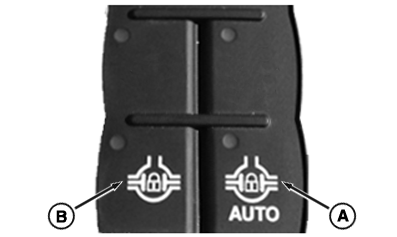
Engage differential lock by selecting either of the two operating positions:
RXA0141547-UN-12MAY14
RXA0153159-UN-04AUG16
Corner Post Display
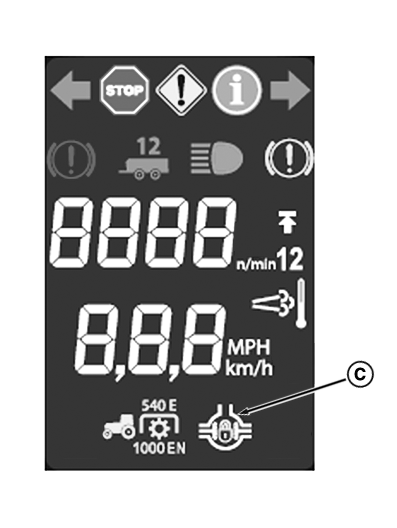
Auto Lock — Enter auto lock by pressing AUTO lock switch (A) on CommandARM™. When in auto lock, AUTO lock switch and differential lock indicator (C) are illuminated. Differential lock indicator turns on or off depending on engagement state of differential lock.- Differential lock disengages when any of the following
conditions are met:
- At startup
- Track speed is more than 23 km/h (14 mph)
- Brake pedal is depressed
-
Foot decelerator (E) is depressed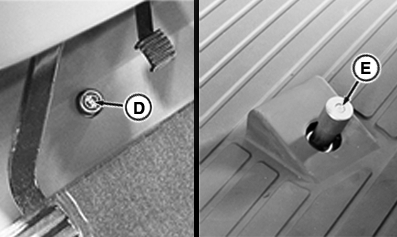
RXA0150427-UN-10NOV15 - Steering angle greater than selected value
Differential lock disengagement steering angle may be user selected. See Change Differential Lock Disengagement Steering Angle in this section of this Operator’s Manual.
- Engages when all the following conditions are met:
- Track speed falls below 19 km/h (12 mph)
- Steering angle less than selected value
- Brake is released
Manual Lock — Enter manual lock by pressing and holding either manual lock switch (B) on CommandARM™ or differential lock floor switch (D). After releasing switch (B) or (D), differential lock will return to previous operating state. When in manual mode, manual lock switch and differential lock indicator are illuminated.
|
CommandARM is a trademark of Deere & Company |
KT81203,00001BB-19-20170727 |