Trailer Brake Settings
If equipped. If brake adjustability screen is not displayed, see John Deere dealer to adjust brake settings.
Pre-Brake
Pre-Brake allows operator to change timing of trailer brake initiation. Trailer brake initiation may need to be adjusted to avoid the trailer “pushing” the tractor.
Modify when:
- After connecting trailer to tractor.
Procedure to modify:
-
Select Pre-Brake (B) module to modify value.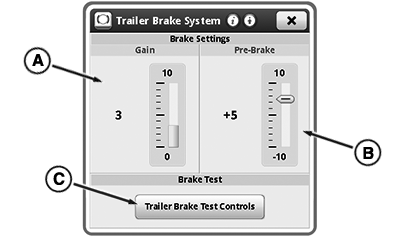
RXA0152440-UN-20JUN16 -
Select + (D) or - (E) to increase or decrease value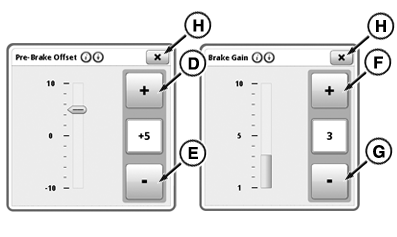
RXA0152444-UN-20JUN16 - Select the close button (H) to exit.
Brake Gain
Brake Gain allows operator to adjust brake to be more aggressive to match trailer requirements.
Modify when:
- Trailer is slow to stop.
- Trailer wheels lock up when brakes are applied.
Procedure to modify:
- Select Brake Gain (A) module to modify value.
- Select + (F) or - (G) to increase or decrease value
- Select the close button (H) to exit.
Trailer Brake Test (If Equipped)
Tractors equipped with dual-line hydraulic trailers brakes have a Trailer Brake Test. Use test to confirm tractor's park brake will hold both tractor and trailer if the trailer brakes are released when parked. The Trailer Brake Test overrides the default park state of the braking system and forces brakes to release.
Modify when:
- Verifying park brake performance.
- Attaching different trailer.
Procedure to modify:
- Place tractor in PARK.
- Press trailer brake test controls button (C) to access trailer brake test.
-
Press and hold release trailer brakes button (I) to bleed brakes.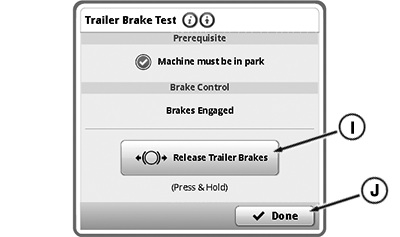
RXA0152443-UN-24JUN16 - Press done button (J) when finished.
|
KT81203,00003E9-19-20170818 |