Automation Status
Automation Status allows control of various tractor functions. Automation Status displays which tractor functions are being controlled and their current status.
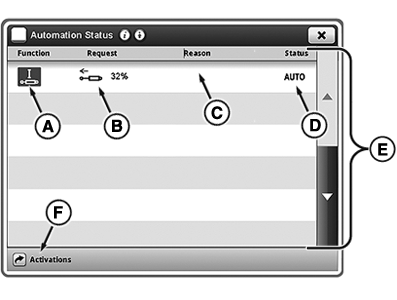
SCV Function Example: SCV status set to AUTO. Implement actively controls SCV 1. Implement requests SCV flow to be set at 32% in extend direction.
-
Select Menu.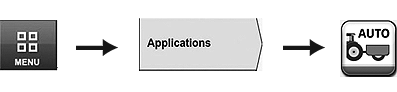
RXA0135014-UN-12AUG13 -
Select Applications tab.
-
Select Automation Status icon.
RXA0135016-UN-12AUG13
Automation Status Page
A - Function
B - Request
C - Reason
D - Status
E - Scroll Bar
F - Activations button
Press Activations button (F) to navigate to Software Manager application.|
KT81203,00004BB-19-20170726 |