Select Radio Receiver Wave Band
Radio stations cannot be received if correct country-specific wave band is not selected for radio receiver. Select correct wave band:
- Move key switch into ACC position.
-
Turn radio off with ON/OFF button (A).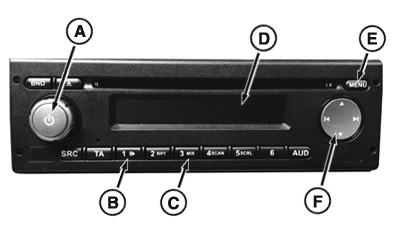
RXA0141571-UN-13MAY14 - Press and hold ON/OFF button, station button 1 (B) and station button 3 (C) until SETUP appears on display (D).
- Press menu button (E) until current wave band (e.g. EUROPE, NAFTA, etc) is shown on display. Countries and their associated wave bands are shown in chart.
- If wave band shown on display is not correct, press multi-function
rocker switch (F) left or right until correct wave band is shown.
If radio will not store selected wave band, radio may
be CommandCenter™ controlled. See your John Deere dealer.
- Without changing selected wave band, turn radio off.
|
Wave Band |
Country |
|
|---|---|---|
|
EUROPE |
Austria Belgium Bulgaria Croatia Denmark United Kingdom Estonia Finland France Hungary Italy Kazakhstan Lithuania Luxemburg |
Latvia Netherlands Poland Portugal Romania Russia Serbia Slovakia Spain Sweden Switzerland Turkey Ukraine |
|
NAFTA |
Canada Dominican Republic |
Mexico United States (USA) |
|
SOTHAMRCA |
Argentina Bolivia Brazil Guyana |
Nicaragua Uruguay Venezuela |
|
MESTAFRC |
Armenia Ethiopia Israel |
Oman South Africa Zambia |
|
APAC |
China Japan |
Korea |
|
AUSTRLNZ |
Australia |
New Zealand |
|
TAIWAN |
Taiwan |
|
|
PHILIPIN |
Philippines |
|
|
CommandCenter is a trademark of Deere & Company |
KT81203,00004C1-19-20170914 |