Pair Bluetooth® Device to Generation 4 CommandCenter™
Radio system is equipped with integrated Bluetooth®, which allows data transfer between radio system and paired close-range Bluetooth® device such as cell phone. Up to five device pairings can be stored in radio's Bluetooth® feature. See Manage Paired Bluetooth® Devices in this section of this Operator’s Manual.
Phone book does not appear on CommandCenter™ display.
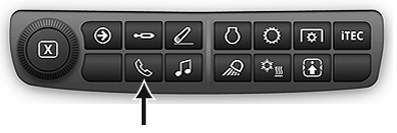
RXA0133719-UN-16JUL13
-
Select Menu.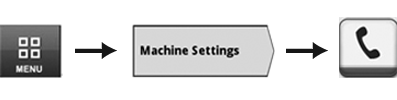
RXA0147930-UN-13APR15 - Select Machine Settings tab.
- Select Phone icon.
- Not ALL devices are able to use Bluetooth® feature on
radio.
Enable Bluetooth® mode on device. -
Select Pair Device button (A) to start pairing process. Once Bluetooth® pairing process is initiated, changes to radio - such as changing source or frequency - cancels pairing.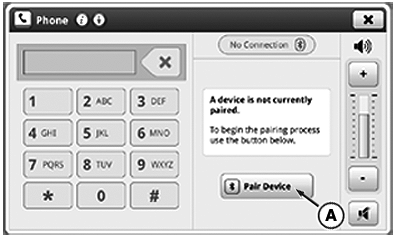
RXA0132157-UN-28JUN13
-
Enter pairing code displayed in Pairing Code box (B) into device. Pairing process begins immediately.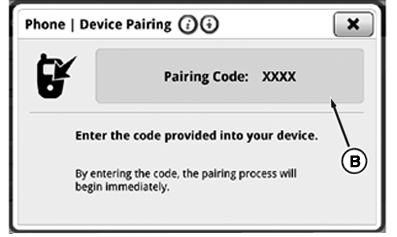
RXA0137741-UN-13DEC13 - Once device is connected successfully, “Pairing Complete” is displayed.
|
Bluetooth is a trademark of Bluetooth SIG CommandCenter is a trademark of Deere & Company |
KT81203,00004CF-19-20161213 |