Phone Operation
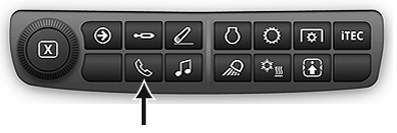
Use Bluetooth® capability to make or receive phone calls from paired Bluetooth® enabled cell phone. See Pair Bluetooth® Device to Generation 4 CommandCenter™ in this section of this Operator’s Manual.
RXA0133719-UN-16JUL13
-
Select Menu.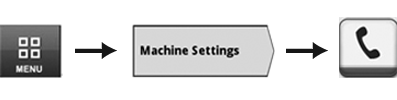
RXA0147930-UN-13APR15 - Select Machine Settings tab.
- Select Phone icon.
- Phone home page appears.
RXA0137742-UN-11DEC13
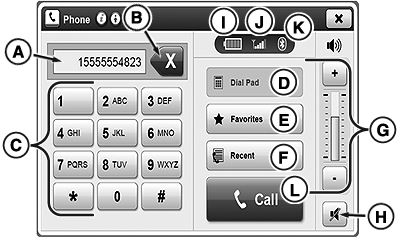
Phone options A, B, C and E are not available during call. Use cell phone if another number is needed.
Phone controls on this page are disabled while device is syncing with radio.
A—Input Box: Displays typed digits.
B—Backspace Button: Cancel typed digit. Press and hold to cancel multiple digits.
C—Dial Pad: Enter phone number using number buttons.
D—Dial Pad Tab: Press to display dial pad during phone call.
Favorites are stored permanently and can be viewed by any operator. Clear favorites before leaving tractor, if desired. See Clear Favorites and Call History in this section of this Operator’s Manual.
E—Favorites Button: View/edit favorites contacts.
F—Recent Button: Review previous missed calls, incoming calls or outgoing calls.
G—Volume Control: Adjust volume.
H—Mute Button: Mutes microphone.
I—Battery Icon: Displays battery life.
J—Signal Icon: Displays current phone signal strength.
K—Bluetooth® Icon: If blue, Bluetooth® device is connected. If grayed out, Bluetooth® device is not connected.
L—Call Button: After dialing or selecting number, press to begin call.
RXA0147774-UN-30MAR15
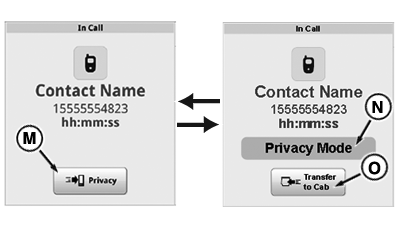
N—Privacy Mode Message: Displays when call has entered privacy mode.
O—Transfer to Cab Button: Exits privacy mode and transfers phone audio from phone speakers to cab speakers
|
Bluetooth is a trademark of Bluetooth SIG CommandCenter is a trademark of Deere & Company |
KT81203,00004D1-19-20170901 |