Add New Sequence
For complete list of functions available, see CommandCenter™ Pages Descriptions and Functions in this section of this Operators Manual.
From iTEC™ main page, follow steps listed below:
-
Select Manage Sequences button.
RXA0158059-UN-02MAR17 - Select All Sequences tab.
- Select New Sequence button.
- Select Add Step button.
Select Cancel button (F) to exit editing process without
saving changes.
-
Select from list of functions (A).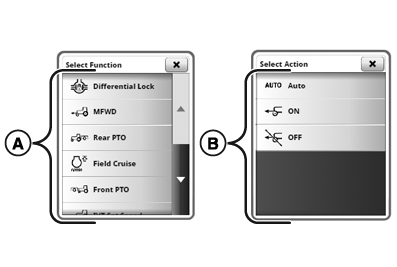
RXA0158057-UN-02MAR17 - Select from list of actions (B).
-
On Step Distance page, use keypad (D) to enter distance into step distance box (C).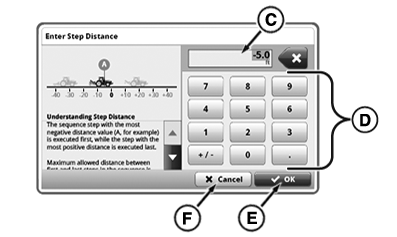
RXA0158047-UN-02MAR17 - Select OK Button (E).
- Repeat steps 4-8 to add steps to sequence.
- Press Next button to continue.
-
Select Sequence Name box (G). Type name of sequence. Select Save/OK button when complete.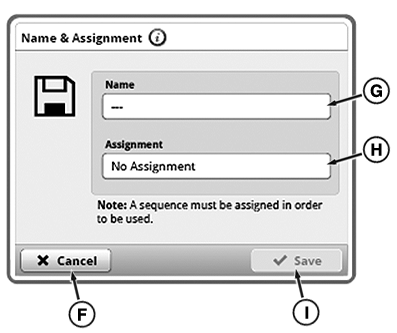
RXA0158048-UN-02MAR17 - A sequence must be assigned in order to be used.
Select Sequence Assignment box (H). Select assignment, if desired, and select Save/OK button when complete. - Select Save button (I) to save sequence.
|
iTEC is a trademark of Deere & Company |
KT81203,00004D9-19-20170822 |