Activate Tractor-Implement Automation™ Equipment
|
Response Codes, Text Descriptions, and Corrective Actions |
||
|
Common Response Codes |
Text Displayed |
Corrective Action |
|
0 |
Code Accepted |
None Required |
|
4 |
Implement Not Available to Deactivate |
Implement already deactivated |
|
5 |
Implement Already Activated |
None Required, implement should work as expected |
|
6 and 11 |
Space Unavailable for Activation |
Contact your dealer for assistance |
|
17 |
Demonstration Activation Replaced With Permanent Activation |
None Required |
To obtain tractor serial number, see Product Identification Number Plate in Identification Numbers section of this Operator’s Manual.
An activation code is required to allow TIA™ to function. Contact your John Deere dealer with tractor serial number and implement make, model, and serial number. Dealer obtains activation code through John Deere StellarSupport™.
-
Select Menu
RXA0131994-UN-22APR13 -
Select System Tab
-
Select Software Manager Icon
-
Select Activations Tab (A)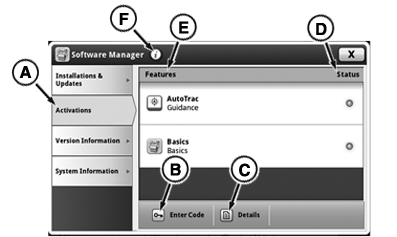
RXA0143147-UN-07JUL14 -
When Activations page displays, press Enter Code button (B). Keyboard will appear.
Some Tractor Automation Activation page keyboard characters are grayed out and are not used in activation codes. If provided activation code includes any characters that are grayed out on Tractor Automation Activation page keyboard, request dealer reconfirm activation code.
-
Using keyboard, enter activation code, then select Save/Enter button.
-
If activation code is entered correctly, confirmation code appears in the enter activation overlay and message is displayed. Code Accepted indicates that activation is complete.
-
If message other than Code Accepted appears, see Response Codes, Text Descriptions, and Corrective Actions table. If message not listed appears, check and reenter code. If problem persists, contact your John Deere dealer.
Up to twenty implement names can be viewed on Tractor Automation Activation page at any given time. When a new entry shows up in Feature List (E), that entry is labeled “Unknown Implement”. The text “Unknown Implement” should change to a real name after first time connecting the implement.
|
TIA is a trademark of Deere & Company StellarSupport is a trademark of Deere & Company |
KT81203,00004E4-19-20170710 |